concept job in category java

This is an excerpt from Manning's book Spring Integration in Action.
Listing 16.5. Triggering jobs with messages sent by a file channel adapter
<si:channel id="files"/> <si:channel id="requests"/> <si:channel id="statuses"> <si:queue capacity="10"/> </si:channel> <si-file:inbound-channel-adapter directory="classpath:/${incoming.directory}" channel="files"/> <si:transformer input-channel="files" output-channel="requests"> <bean class="com.manning.siia.batch.FileMessageToJobRequest"> <property name="job" ref="importPayments"/> <property name="fileParameterName" value="input.file.name"/> </bean> </si:transformer> <si:service-activator method="launch" input-channel="requests" output-channel="statuses"> <bean class="org.springframework.batch.integration.launch.JobLaunchingMessageHandler"> <constructor-arg ref="jobLauncher"/> </bean> </si:service-activator>
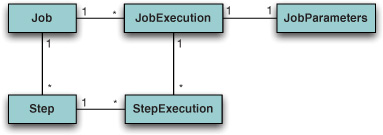
The role of the JobLauncher is to create a new batch job instance according to the Job definition. The JobParameters passed as arguments while launching the job fulfill a dual role: as their name indicates, you can use them to pass particular properties that are specific to this job execution instance (such as the name of the file that needs to be processed), and you can also use them as unique identifiers of the Job execution.
There can be no two JobExecutions for the same Job and JobParameters set of values. This is an important point to take into account when executing batch jobs automatically: when launching a new job instance, the list of parameters must contain at least one unique attribute; otherwise, the launcher will complain that the job has already completed.
The returned JobExecution is a handle that allows the invoker to access the state of the executing Job. Spring Batch supports synchronous and asynchronous execution of batch jobs (which can be configured through the jobLauncher bean definition), which means that the call to JobLauncher.run() may return while the job is in progress. As such, an application may track the progress of a batch job by repeatedly inquiring on the JobExecution instance about the current state.
You got a hint in the previous section about what we discuss in the next section. The JobLauncher bean we configured in listing 16.4 is injected with a jobRepository. As we explained earlier, the state of the batch jobs is persistent so that jobs can be resumed after a failure or a shutdown. Resuming a job that stopped in the middle of processing a data stream requires avoiding the potential duplication of data that may occur as a result of processing items twice. The job repository records the ongoing progress of the running batch jobs, including information such as the current step and how far the application got while processing the data stream that corresponds to a particular step.
This is an excerpt from Manning's book The Well-Grounded Java Developer.
Performance analysis is really a type of experimental science. You can think of your code as a type of science experiment that has inputs and produces “outputs”—performance metrics that indicate how efficiently the system is performing the work asked of it. The job of the performance engineer is to study these outputs and look for patterns. This makes performance tuning a branch of applied statistics, rather than a collection of old wives’ tales and applied folklore.
Table 12.2. Hallmarks of a good CI build and how Jenkins fulfills those
Hallmark
Jenkins fulfillment
Automatic builds Jenkins will run builds anytime you want it to. It can do so automatically via build triggers. Always tested Jenkins will run any goals you like, including the Maven test goal. It has powerful trend reporting on test failures and can report a build as failing if the tests don’t all pass. Regular commits This one is up to the developers! Build each commit Jenkins can perform a build each time it detects a new commit to the version control repository. Fast builds This is more important for your unit-test based builds, because you want these to have a fast turnaround time. Jenkins can help here by sending off jobs to slave nodes, but more often it’s up to the developers to have a lean, mean build script and to configure Jenkins to call the right build lifecycle goals when executing a build. Visible results Jenkins has a web-based dashboard as well as a host of notification methods.
To set up a job to build the java7developer project, give the job a title (java7developer), choose the Build a Maven2/3 Project option and click the OK button to continue. You should be taken to a configuration screen whose top section looks similar to figure 12.5.

This is an excerpt from Manning's book Griffon in Action.
Next, you’ll spend some time working with the menu items. You’ve hard-coded the names of the actions into the view of your application. Griffon lets you separate your action code from the rest of your application. Defining an action also leads to code reuse, because many Swing components can use the action definition to configure themselves—for example, their label and icon—and also to handle the job they’re supposed to do.
As you’ve seen, the EDT is both a blessing and a curse. On one hand, it makes the job of dispatching events in a serialized way a reality. On the other hand, it spells disaster if developers don’t take special care to avoid executing long-running operations on it.