concept JUnit in category java

This is an excerpt from Manning's book JUnit in Action.
If you recognize the names Erich Gamma and Kent Beck, that’s for a good reason. Gamma is one of the Gang of Four who gave us the now-classic Design Patterns book.[3] Beck is equally well known for his groundbreaking work in the software discipline known as Extreme Programming (www.extremeprogramming.org).JUnit quickly became the de facto standard framework for developing unit tests in Java. Today, JUnit (https://junit.org) is open source software hosted on GitHub, with an Eclipse Public License. And the underlying testing model, known as xUnit, is on its way to becoming the standard framework for any language. xUnit frameworks are available for ASP, C++, C#, Eiffel, Delphi, Perl, PHP, Python, REBOL, Smalltalk, and Visual Basic—to name just a few.
Figure 3.4 The monolithic architecture of JUnit 4: a single JAR file

Listing 4.1 The JUnit 4 Maven dependency
<dependencies>
    <dependency>
    <groupId>junit</groupId>
    <artifactId>junit</artifactId>
    <version>4.12</version>
    <scope>test</scope>
    </dependency>
</dependencies>
In this chapter, we will analyze and compare the main IDEs that can be used to develop Java applications tested with the help of JUnit 5. An integrated development environment (IDE) is an application that provides software development facilities for computer programmers. Java IDEs are tools that let us write and debug Java programs more easily.
This is an excerpt from Manning's book Java Testing with Spock.
The following listing presents the Java class you’ll test. For comparison, a possible JUnit test is first shown, as JUnit is the de facto testing framework for Java, still undisputed after more than a decade.
JUnit doesn’t support mocking and stubbing on its own. Several Java frameworks fill this position. The main reason that I became interested in Spock in the first place is that it comes “batteries included,” with mocking and stubbing supported out of the box. As figure 1.16 shows, it does even more than that.
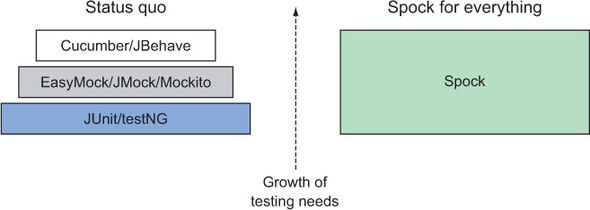
Comparing JUnit and Spock in a single section is difficult because both tools have a different philosophy when it comes to testing. JUnit is a Spartan library that provides the absolutely necessary thing you need to test and leaves additional functionality (such as mocking and stubbing) to external libraries.
Spock takes a holistic approach, providing a superset of the capabilities of JUnit, while at the same time reusing its mature integration with tools and development environments. Spock can do everything that JUnit does and more, keeping backward compatibility as far as test runners are concerned.
What follows is a brief tour of some Spock highlights. Chapter 3 compares similar functionality between Spock and JUnit. If you’re not familiar with JUnit, feel free to skip the comparisons and follow the Spock examples.
Listing 3.3. JUnit test with complex structure (real example)
private static final String MASTER_NAME = "mymaster";
private static HostAndPort sentinel = new HostAndPort("localhost",26379);

@Test
public void sentinelSet() {
    Jedis j = new Jedis(sentinel.getHost(), sentinel.getPort());

    try {
            Map<String, String> parameterMap = new HashMap<String,
                                          String>();
            parameterMap.put("down-after-milliseconds",
                   String.valueOf(1234));
            parameterMap.put("parallel-syncs", String.valueOf(3));
            parameterMap.put("quorum", String.valueOf(2));
            j.sentinelSet(MASTER_NAME, parameterMap);

            List<Map<String, String>> masters = j.sentinelMasters();
            for (Map<String, String> master : masters) {
                     if (master.get("name").equals(MASTER_NAME)) {
                          assertEquals(1234, Integer.parseInt(master
                                   .get("down-after-milliseconds")));
                          assertEquals(3,
                                   Integer.parseInt(master.get("parallel-
                                   syncs")));
                           assertEquals(2,
                                   Integer.parseInt(master.get("quorum")));
                   }
            }

            parameterMap.put("quorum", String.valueOf(1));
            j.sentinelSet(MASTER_NAME, parameterMap);
    } finally {
            j.close();
    }
}

This is an excerpt from Manning's book Testing Java Microservices: Using Arquillian, Hoverfly, AssertJ, JUnit, Selenium, and Mockito.
This book uses many different software packages and tools, all of which change periodically. We tried throughout the book to present examples and techniques that wouldn’t be greatly affected by these changes. All examples require Java 8, although when we finished the book, Java 10 had been released. We haven’t updated the examples because in terms of testing microservices, the release doesn’t add anything new. Something similar is true for JUnit 5. All of the examples are written using JUnit 4.12, because when we started writing the book, JUnit 5 wasn’t yet in development. At the time we finished the book, not all of the frameworks explained here have official support for JUnit 5, so we decided to skip updating the JUnit version. Other libraries, such as Spring Boot and Docker (Compose), have evolved as well during the development of the book, but none of these changes have a significant impact on how to write tests.
Pact JVM is partially written in Scala, Groovy, and Java, but it can be used with any JVM language. It integrates perfectly with Java, Scala, Groovy, Grails (providing a Groovy DSL for defining contracts), and Clojure. In addition, it offers tight integration with test frameworks like JUnit, Spock, ScalaTest, and Specs2, as well as build tools such as Maven, Gradle, Leiningen, and sbt. This book focuses on Java tools, but keep in mind that if you plan to use any other JVM language, you can still use Pact JVM for consumer-driven contract testing.
This is an excerpt from Manning's book The Well-Grounded Java Developer.
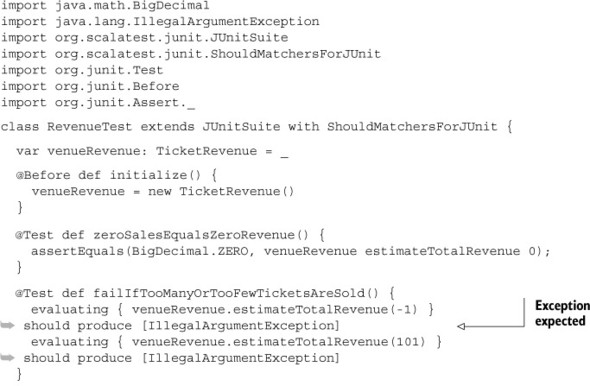
But there’s more to a system than its core processing. For example, this is a situation where better tests would clearly help. Scala has a great testing framework called ScalaTest (which we’ll meet properly in chapter 11). It enables developers to produce JUnit-like tests for Java or Scala code, but without a lot of the boilerplate that JUnit seems to generate. So once they’re over the initial ScalaTest learning curve, developers can be much more productive at improving the test coverage. ScalaTest also provides a great way to gradually introduce concepts like behavior-driven development to the codebase. The availability of modern testing features can really help when the time comes to refactor or replace parts of the core—whether the new processing engine ends up being written in Java or Scala.
This chapter will begin by explaining the basic idea behind TDD—the red-green-refactor loop. Then we’ll introduce the workhorse of Java testing, JUnit, and look at a simple example that illustrates the principles.

This is an excerpt from Manning's book Spring Roo in Action.
You’re about to be introduced to a powerful new tool that makes your life as a Java application developer less stressful and more productive. That tool is Spring Roo. With a simple command-line shell, Roo can create and manage Spring-based applications, adding and configuring features such as the Java Persistence API (JPA), the Java Message Service (JMS), email, and Spring Security. Roo generates Spring MVC web applications. These allow you to manage and edit your database data, configure tests using frameworks such as JUnit and Selenium, and choose from a variety of ORM APIs and databases. At the same time, Roo reduces the amount of code written by you and rolls out efficient, customizable generated code.
Writing code against the Roo entity API is a cinch. Beyond the automatically generated calls you’ll see when you wire up a Roo web application in chapter 5, you can get started coding right away using JUnit.

This is an excerpt from Manning's book JUnit in Action, Second Edition.
JUnit (http://www.junit.org) is open source software, released under IBM’s Common Public License Version 1.0 and hosted on SourceForge. The Common Public License is business friendly: people can distribute JUnit with commercial products without a lot of red tape or restrictions.
JUnit quickly became the de facto standard framework for developing unit tests in Java. The underlying testing model, known as xUnit, is on its way to becoming the standard framework for any language. There are xUnit frameworks available for ASP, C++, C#, Eiffel, Delphi, Perl, PHP, Python, REBOL, Smalltalk, and Visual Basic—to name a few!
JUnit has many features that make it easy to write and run tests. You’ll see these features at work throughout this book:
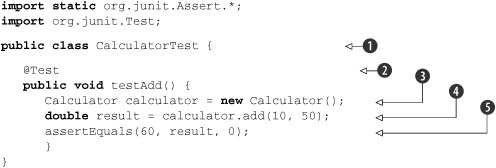
Without further ado, let’s turn to listing 1.4 and see what the simple Calculator test looks like when written with JUnit.
This is a much simpler test; let’s walk through it. At
, we start by defining a test class. The only restriction is that the class must be public; we can name it whatever we like. It’s common practice to end the class name with Test. Notice also that in contrast to JUnit 3 where we needed to extend the TestCase class, this requirement has been removed in JUnit 4.
At
, we mark the method as a unit test method by adding the @Test annotation.[6] A best practice is to name test methods following the testXXX pattern. JUnit doesn’t have method name restrictions. You can name your methods as you like; as long as they have the @Test annotation, JUnit will execute them.