concept portlet title in category java

This is an excerpt from Manning's book Portlets in Action.
Language-ext.properties file— This is the properties file used by the portlet to support localization. In the Hello World example, this file is used to specify the portlet title and to assign a category under which the Hello World portlet should be displayed in Liferay Portal (refer to figure 1.19).
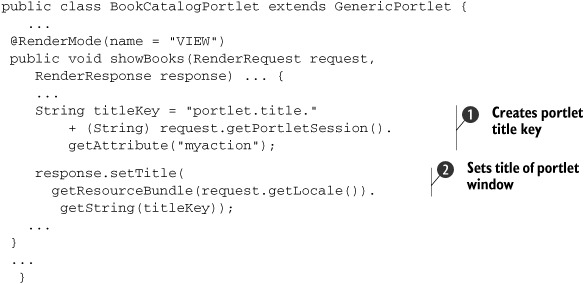
In previous chapters you saw examples where the complete request-processing logic was contained within the lifecycle methods of the portlet. For instance, in the Book Catalog portlet, the logic that sets the title of the portlet window, based on the value of the myaction request parameter, is part of the request-processing logic. Similarly, you can have request-logging logic in lifecycle methods that log requests to a log file, which is later analyzed by a log-analyzer tool to generate important statistics. The logic inside a lifecycle method can’t be used by other portlets, because it’s tightly coupled with the portlet class, so you can’t reuse the logic to programmatically set the portlet title and to log requests.
To dynamically set the portlet title, PortletTitleFilter uses the following strategy to identify the portlet title in the title.properties file:
The portlet title has the following format: portlet.title.<value of reqParamName parameter>, where <value of reqParamName parameter> refers to the value of the request parameter whose name is the value of the reqParamName filter initialization parameter. In the case of the Book Catalog portlet, the value of reqParamName is myaction, so the value of the myaction parameter is used to identify the portlet title in the title.properties file. For instance, if the name of the myaction parameter is addBookForm, the value of the portlet.title.addBookForm property in the title.properties file is set as the title of the Book Catalog portlet. If the portlet title isn’t found in the title.properties file, the value of the portlet.title.default property is used as the portlet title. This situation will arise if the developer forgets to specify a portlet title in the title.properties file or if the request parameter isn’t found in the request.