concept PortletPreferences in category java

This is an excerpt from Manning's book Portlets in Action.
Save user preferences into a persistent store using the PortletPreferences object
You can reset a preference by calling the PortletPreferences object’s reset method, as shown here:
prefs.reset("category");Here, prefs is the PortletPreferences object, and category identifies the preference that needs to be reset.
You must not call the PortletPreferences object’s store method from inside the validate method of the PreferencesValidator class because the portlet container constrains the validate method to perform validation only.
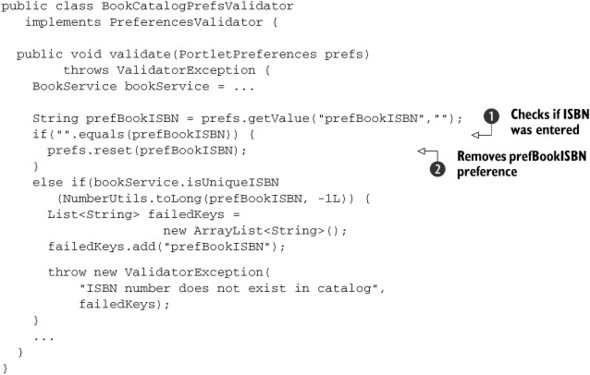
In listing 10.9, there’s a reason for checking the ISBN for a blank value before setting it in the PortletPreferences object. BookCatalogPrefsValidator is responsible for validating the preferences set in the PortletPreferences object, and should not be used to modify or change them in any way.
Let’s see what BookCatalogPrefsValidator would look like if you set the ISBN directly in the PortletPreferences object without doing a check for a blank entry. The modified BookCatalogPrefsValidator is shown next.
BookCatalogPrefsValidator
checks whether the prefBookISBN preference is empty or null. The validator
attempts to remove the prefBookISBN preference from the PortletPreferences object using the reset method, because saving blank or null as the value of the preferred book’s ISBN is invalid.
You saw in the previous section that the PortletPreferences object is used to save user preferences into a persistent store. The PortletPreferences object is obtained by the portlet request’s getPortletPreferences method, and it defines methods to retrieve, set, and store preferences.
In most situations, portlet developers treat the portal database as a black box, not worrying about how preferences are stored to or retrieved from it. The Portlet API shields portlet developers from details of the portal database by providing the PortletPreferences object, which is implemented by portal server vendors and encapsulates the logic for retrieving and storing preferences from and to the portal database.
In this section, we’ll focus on saving preferences to a persistent store using the PortletPreferences object. In section 10.7, we’ll discuss how you can obtain saved preferences from the PortletPreferences object.
Table 10.1 shows some of the important methods in the PortletPreferences interface and describes them briefly.
Table 10.1. PortletPreferences methods
Method
Description
String getValue(String key, String default) Returns the first String value associated with the preference identified by key. If the preference isn’t found, it returns default as the value of the preference. String[] getValues(String key, String[] defaults) Returns the String values (as an array) associated with the preference identified by key. If the preference isn’t found, it returns defaults as the value of the preference. void setValue(String key, String value) Sets the preference identified by key with a value identified by the value argument in the PortletPreferences object. void setValues(String key, String[] values) Sets the preference identified by key with an array of values identified by the value argument in the PortletPreferences object. void store() Saves preferences set in the PortletPreferences object to a persistent store. void reset(String key) Resets the value of the preference identified by key to its default value. boolean isReadOnly(String key) Checks whether the preference identified by key is read-only or modifiable. You saw in the previous section how you can use the setValue, setValues, and store methods of the PortletPreferences object. Later in this chapter, we’ll discuss the use of the getValue and getValues methods to retrieve preferences to either personalize portlet content (and behavior) or to display the preferences already set by the user on a JSP page. For now, we’ll discuss the two most interesting methods of PortletPreferences: the store and reset methods.
The PortletPreferences object’s store method persists the preferences that you had previously set using the setValue and setValues methods. If you set preferences on the PortletPreferences object after calling the store method, those preferences won’t be persisted. To make this point clear, the next listing shows an example in which preferences are set after calling the store method.