concept subclass in category java
This is an excerpt from Manning's book Get Programming with Java.
Lesson 2 introduced the topic of classes and objects which are required for any object-oriented (OO) programming language. In a later lesson, I will review the concept of Inheritance in much more detail, but to help understand the concepts of visibility modifiers, I want to explain the relationship of a class and subclass. In Java, we can create a ‘child’ class using another class as the ‘parent’. This new class becomes a subclass and the parent is called the superclass. This is one of the strengths of Java, it is referred to as inheritance. Inheritance allows us to create a class that inherits all the public and protected information from the superclass and adds any additional information necessary for the subclass. For example, our Car class could be a subclass of a Vehicle class.
In this example, tools can be objects that require electric, gas, or operate manually. In other words, power tools vs. manual tools. The term tool represents a wide variety of items. When thinking in terms of Java and modelling these items, tool can be considered the parent or super class. Then each tool can be represented by a subclass of tool. A lawn mower is a tool. The term “is-a” is often used to evaluate the relationship between two objects. When this is true, then we have an example of inheritance, a term used in object-oriented programming to represent this parent-child relationship.
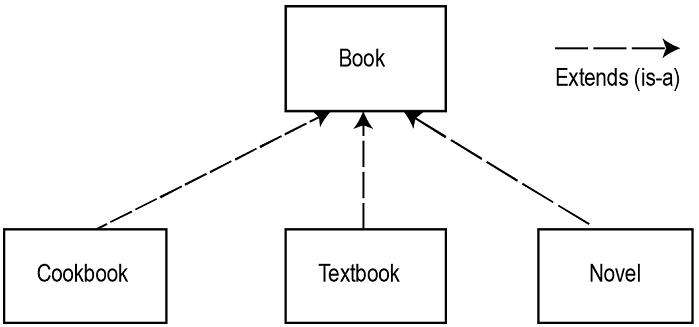
Figure 14.3 Book class and subclasses: Cookbook, Textbook, and Novel
14.2 Write an overridden method in a subclass
A subclass within the same package as the parent class can override any method that is not declared private or final. Using the example from figure 14.3, the Book class can have a printPage method representing the code to print a page of a book. The three subclasses all override this method and print different messages for each instance of the subclass. For this example, I am simply printing a message to demonstrate which version of the printPage method is called based on the calling object. Figure 14.4 shows the expected output when executing the code in Listing 14.1, which shows the code for the Book class and the three subclasses. Note that each subclass overrides the printPage method from the Book class.
Figure 14.4 Sample output demonstrating an overridden method from the Book class

Listing 14.1 Code for the Book class and the subclasses Cookbook, Textbook , and Novel
1     public class Book {
 2         public String title, publisher;
 3         public String[] authors;
 4         public int numPages;
 5     public Book(String title, String publisher, String authors[],//#A
 6         int numPages){
 7             this.title = title;
 8             this.authors = authors;
 9             this.numPages = numPages;
 10            this.publisher = publisher;
 11        }
 12        public void printPage(){          //#B
 13            System.out.println("Super class of all books");
 14        }
 15       public static void main(String[] args) {
 16       Book book = new Book("Generic Book", "Manning", new String[]{}, 0);  //#C
 17       Book text = new Textbook("Get Programming with Java", "Manning", //#D
 18         new String[]{"Peg Fisher"},544 );
 19       book.printPage();  //#E
 20       text.printPage();   //#F
 21       }
 22    }
 23    class Textbook extends Book {  //#G
 24    public Textbook(String title, String publisher, String authors[], int numPages){
 25         super(title,publisher,authors,numPages); }  //#H
 26    public void printPage() {   //#I
 27         System.out.println("Print page from textbook: "+title); }
 28    }
 29    class Cookbook extends Book {
 30    //code omitted  }   //#J
 31    class Novel extends Book {
 32    //code omitted  }    //#J