concept update in category java

This is an excerpt from Manning's book Griffon in Action.
A BindingUpdatable object for a binding that isn’t currently bound isn’t totally useless. In addition to having its binding activated, the binding can also be manually fired via the update() method. When this method is called, the read and write portions of the binding are fired as if the trigger for the property change had caused their update to occur automatically. This is particularly useful when the unbind() method has been called or the binding was created with bind: false as an attribute. It’s worth remarking that the read is performed on the source and the write happens on the target.
The update() method also has a corresponding method, reverseUpdate(), that will, if possible, reverse the role of the read and the write methods and do the update in reverse. This method won’t work in all situations; in those cases, the reverse update will silently fail. In particular, this will happen if the binding is a closure binding or the source comes from a sourceValue closure. Principally this works with property-source bindings where the source property is writable.
It so happens that the majority of events posted to the event queue are paint requests; the rest deal with updates that may affect the UI state, possibly triggering another paint request as a byproduct. This means the EventQueue is busy properly updating the visuals of your application most of the time.
This is an excerpt from Manning's book JavaFX in Action.
This simple example updates the variable percentage from 0 to 100 in steps of 20 using a for loop (which we’ll study next chapter), with the variable progress automatically tracking the updates.
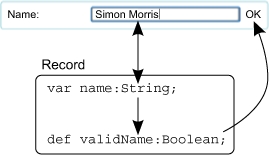
So for this, our first project, we won’t be developing any flashy visuals or clever animations. Be patient. Instead we need to start putting all the stuff you learned over the last few dozen pages to good use. A common paradigm in UI software is Model/View/Controller, where data and UI are separate, interacting by posting updates to each other. The model is the data, while the view/controller is the display and its input. We’re going to develop a data class and a corresponding UI to see how the language features of JavaFX Script allow us to bind them together (pun only partially intended). But first we need to decide on a simple project to practice on, something fun yet informative.
Now we know how each group is checked, and we’ve seen the power of using function types to allow us to reuse code with plug-in-able variations, but we still need to complete the picture. The function update() will call checkGroup() 27 times (assuming a standard 9 x 9 grid), but what makes update() run?
We could wire something into our button event handler to always call update(), but this would be exposing the PuzzleGrid class’s inner mechanics to another class, something we should avoid if we can. So why not wire something into the actual grid sequence itself?
package var grid:Integer[] =
    for(a in [0..<gridSize]) { 0 }
        on replace current[lo..hi] = replacement {
            update();
        }