concept xml in category java

This is an excerpt from Manning's book Making Java Groovy: Foreword by Guillaume Laforge.
Over time Java also accumulated inconsistencies. For example, arrays have a length property, strings have a length method, collections have a size method, and node lists (in XML) have a getLength method. Groovy provides a size method for all of them.
Figure 2.7. Building Groovy Baseball, part 3—drive system and generate XML

I’ve saved the best for last. XML is where the ease-of-use gap between Groovy and Java is the largest. Working with XML in Java is a pain at best, while parsing and generating XML in Groovy is almost trivial. If I ever have to deal with XML in a Java system, I always add a Groovy module for that purpose. This section is intended to show why.
Listing B.5. Slurping XML
String fileName = 'books.xml' def books = new XmlSlurper().parse(fileName) assert books.book.size() == 4 assert books.book[0].title == "Groovy in Action" assert books.book.find { it.@isbn == "9781935182948" }.title == "Making Java Groovy" def prices = [] books.book.price.each { prices << it.toDouble() } assert prices == [39.99, 35.99, 35.99, 27.50] assert prices.sum() == 139.47Groovy uses two different classes for working with XML. The previous example used an XmlSlurper. Groovy also includes an XmlParser. The XmlParser creates a tree of Node instances, so if you need to approach the file from a node point of view, use the parser. The result is that you’ll need to invoke a text method on each node to retrieve the text data, but otherwise the two approaches are virtually the same.
Parsing XML is therefore quite easy. What about generating XML? That’s the subject of the next subsection.

This is an excerpt from Manning's book Spring Integration in Action.
Everything depicted in the core messaging area of the figure would exist within the scope of a single Spring application context. Those components would exchange messages in a lightweight manner because they’re running in the same instance of a Java Virtual Machine (JVM). There’s no need to worry about serialization, and unless necessary for a particular component, the message content doesn’t need to be represented in XML. Instead, most messages will contain plain old Java object (POJO) instances as their payloads.
Chapter 6 discussed routing, and you saw that the flow of a message through the system, or the chain of events caused by the arrival of a message, is usually dependent on its payload. We discussed in chapter 5 that transforming payloads to and from an intermediate format, such as XML, is essential to integrating different systems with each other.
There are many exchange formats in the wild, but none is as widespread as XML. Virtually all programming languages have some sort of XML support. From JavaScript to PL/SQL (Procedural Language/Structured Query Language), from Smalltalk to Scala, all these languages share knowledge of this common format.
Integration components generally don’t need detailed knowledge of the domain, but they do need to react to the contents of a message. If both input and output are XML messages, and simple message processing is all that’s required, marshalling the message (as we discussed in chapter 5) will cause unnecessary complexity and overhead. In such cases it’s better to work on the XML directly, using, for example, XPath or Extensible Stylesheet Language Transformation (XSLT). Where more complex processing is required, it’s often preferable to convert the XML message to a domain object, so this chapter also looks at the object-to-XML mapping (OXM) support provided by the frameworks.
Because XML is the most commonly used interoperable format, it makes sense to equip an integration framework with support for this language. We discuss the details of Spring Integration’s XML support, including the different payload types supported by the provided XML endpoints. In common with the rest of the framework, the XML module is rooted in the enterprise integration patterns and provides support for those patterns to make working with XML simple.
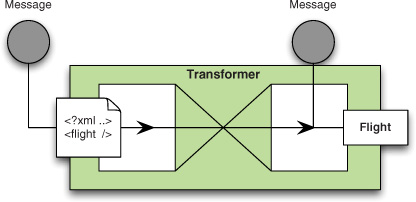
To convert your message between XML and objects, you use OXM. This conversion process is commonly called marshalling and unmarshalling. Spring provides a generic technology-agnostic abstraction of the process of mapping between Java and XML in the Spring OXM module. Spring OXM provides a common interface across a number of leading Java OXM solutions. By providing a common abstraction, the OXM module decouples code from the implementation details and provides a consistent exception hierarchy regardless of the OXM technology being used. This decoupling is achieved by encapsulating the mapping process behind implementations of the Marshaller interface, which maps from an Object to the XML Result, and the Unmarshaller interface, which maps from a Source to the Object representation. Both of these interfaces are shown in the following code snippets, and the unmarshaller is visualized in figure 8.1:[1]
This is an excerpt from Manning's book The Well-Grounded Java Developer.
XML is an excellent, verbose data exchange language that has become much maligned these days. Why? Because software developers have attempted to treat XML as a programming language, something it isn’t suited for because it isn’t a Turing complete language.9 Hopefully in your projects, XML is being used as it was intended, to exchange data in a human-readable format.
In this section, we’ll focus on XML, a common format for exchanging data. Although the core Java language (via JAXB and JAXP) and a virtual army of third-party Java libraries (XStream, Xerces, Xalan, and so on) do give you a lot of power with XML processing, deciding which solution to pick can often be confusing, and the Java code to utilize those solutions can become quite verbose.
This section will take you through creating XML from Groovy and show how you can parse that XML back into GroovyBeans.
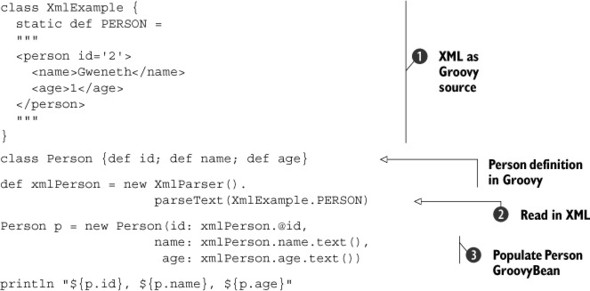
Let’s take the XML representing “Gweneth” (a person) produced in listing 8.8 and parse it back into a Person GroovyBean. The following code listing demonstrates this.

This is an excerpt from Manning's book Portlets in Action.
The primary responsibility of a portlet is to generate a markup fragment (such as HTML, XML, or WML), which is then displayed on a portal page within a window, called a portlet window. A portal page usually displays multiple portlets in distinct portlet windows, each with its own title and set of buttons to change its look and feel, set its preferences, and maximize, minimize, or remove the window.
The <actionURL> tag’s escapeXML attribute indicates whether characters like &, >, <, and so on, are converted into their corresponding character entity codes, like &, >, <, and so on. If a portlet relies on a URL generated by the <actionURL> tag that isn’t XML-escaped, you should set this attribute’s value to false. The default value for the escapeXML attribute is true. Refer to section 3.7.3 of chapter 3 for more about escaping XML in portlet URLs.
This is an excerpt from Manning's book JavaFX in Action.
Listing 8.5 is the second half of our parser class. It contains the code that responds to the PullParser events. So we’re not working blindly, the following is an example of the sort of XML the web service might reply with. Each opening element tag, closing element tag, and loose text content inside an element cause our event handler to be called.

This is an excerpt from Manning's book AspectJ in Action, Second Edition.
The use of XML to define pointcuts offers an easy way to modify the definition and affect system behavior without recompilation. For example, if you need to monitor the execution of methods in banking classes along with JDBC, you change the pointcut to the following definition:
    <pointcut name="monitored"
              expression="call(* java.sql.*.*(..))
                      || execution(* ajia.banking..*.*(..))"/>
Note that you can replace the binary operators || and && with OR and AND for pointcuts written using XML. This substitution is especially helpful for writing the && operator, which in XML is written &&.
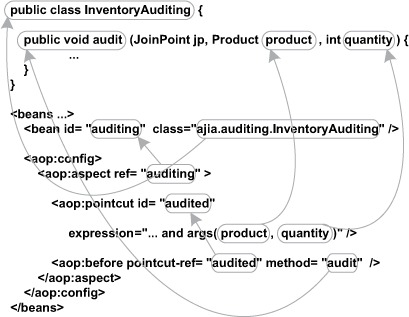
The first two may vary depending on factors such as the possibility of changing the existing code (to add, say, annotations) and personal preference (such as XML versus annotations). Whichever style you use, the advice needs to perform the same task of starting and stopping transactions. Therefore, you write an abstract aspect, deferring the choice of defining the pointcut and obtaining transactional attributes to its subaspects.

This is an excerpt from Manning's book GWT in Practice.
Add XML and XHR to the mix, along with more browser differences, and you can see why Ajax development has a well-deserved reputation on the street as being difficult. GWT doesn���t avoid that difficulty directly, but it does encapsulate it and allow developers to worry about their application, rather than about the differences among browsers. GWT lets you work on a single code base, using Java, and then cross-compile that code into Ajax-enabled HTML and JavaScript for most of the major browser types and versions currently in use (Internet Explorer, Firefox, Safari, and Opera at present).
POX usually just involves an application interface exposed as XML with data transferred over HTTP. REST (http://www.ics.uci.edu/~fielding/pubs/dissertation/top.htm) is a little more descriptive. It deals with XML (or other format) representations of objects handled by actions represented by the four standard HTTP request methods:PUT, GET, POST, and DELETE. These map to the CRUD (Create Read Update Delete) operations most people use to describe basic data-centric applications. For instance, suppose you were dealing with blog entries. To create a new entry, you would PUT an <entry> element to the URI that is the root of the entries. This PUT would result in an ID being assigned and a URI allocated, typically the same as the ID, and a subsequent POST of an <entry> element to that URI would update the existing entry. There is a REST-style protocol for blogs called the Atom Publishing Protocol, that follows this exact pattern.
Now that we’ve looked at how to send and receive XML data via HTTP, we need a way to deal with the XML itself. GWT includes this functionality in the com.google.gwt.xml.XML module. Once we have added the appropriate <inherits> element to the gwt.xml file, it becomes available to our code.