concept Apache in category javascript

This is an excerpt from Manning's book Node.js in Practice.
Though it’s possible to host Node applications behind other web servers like Apache and nginx, there are times when you’ll want to run your own HTTPS servers. This technique introduces the https module and shows how it’s related to the tls module.
This chapter shows you how to safely release and maintain Node programs. It covers privately hosted servers that use Apache and nginx, WebSockets, horizontal scaling, automated deployment, logging, and ways to boost performance.
Deploying Node to private servers running Apache or nginx is entirely possible, and recommended for certain situations. This technique demonstrates how to run a Node program behind Apache and nginx.
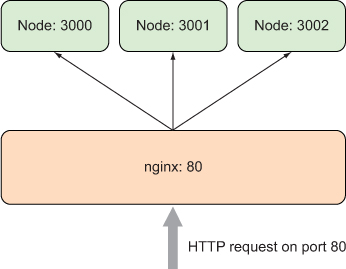
This technique presents examples for Apache and nginx. They’re both web servers, but their configuration formats are very different, and they’re built in different ways. Figure 12.6 shows the basic server architecture that we’ll create in this section.
It’s not actually necessary to run a web server—there are ways to make Node programs safely access port 80. But we assume that you’re deploying to a server that has existing websites. Also, some people prefer to serve static assets from Apache or nginx.
The same technique is used for both servers: proxying. The following listing shows how to do this with Apache.