concept CommonJS in category javascript

This is an excerpt from Manning's book Secrets of the JavaScript Ninja, Second Edition.
Whereas AMD was built explicitly for the browser, CommonJS is a module specification designed for a general-purpose JavaScript environment. Currently it has the biggest following in the Node.js community.
CommonJS uses file-based modules, so we can specify one module per file. To each module, CommonJS exposes a variable, module, with a property, exports, which we can easily extend with additional properties. In the end, the content of module.exports is exposed as the module’s public interface.
If we want to use a module from other parts of the application, we can require it. The file will be synchronously loaded, and we’ll have access to its public interface. This is the reason that CommonJS is much more popular on the server, where module fetching is relatively quick because it requires only a file-system read, than on the client, where the module has to be downloaded from a remote server, and where synchronous loading usually means blocking.
Let’s look at an example that defines our reoccurring MouseCounterModule, this time in CommonJS.
Listing 11.4. Using CommonJS to define a module
//MouseCounterModule.js const $ = require("jQuery"); #A let numClicks = 0; const handleClick = () => { alert(++numClicks); }; module.exports = { #B countClicks: () => { $(document).on("click", handleClick); } }; #A - Synchronously requires a jQuery module #B - Modifies the module.exports property to specify the public interface of a module !@%STYLE%@! {"css":"{\"css\": \"font-weight: bold;\"}","target":"[]"} !@%STYLE%@!

This is an excerpt from Manning's book Front-End Tooling with Gulp, Bower, and Yeoman.
The module is now usable much like in the previous example, but without callbacks, in a synchronous manner. There’s no need for dependency tree definitions because they’re resolved on the fly when needed. With the omission of callbacks and dependency definitions, the code becomes much clearer and more understandable, especially for people unfamiliar with the asynchronicity of JavaScript. This also led to CommonJS slowly becoming the preferred way of defining and loading modules.
I must say a word about loading, though. CommonJS is a truly synchronous loading mechanism, meaning that each require statement stalls the execution and waits until the module is loaded. Figure 9.4 illustrates this.
And even if your projects start out the same, over the course of time, they’re going to differ heavily from each other, both in content and in the structure you’re going to use. Think of deciding on one module definition system (UMD, AMD, or CommonJS) at the start of your project. With the addition of each new module, the structural similarities between projects get fewer and fewer. As you switch between projects, or newcomers join the development phase over time, adding new modules or files correctly to your existing project will be subject to friction.
Let’s take the sub-generator issue for a first step. You want to split AMD, UMD, and CommonJS into separate sub-generators and use the myproject:module generator as a common interface for one of the other three. This allows separation of concerns. You can do different things with your sub-generators and call them individually if you need to. The module sub-generator still helps you with preselection but doesn’t actually contain template files anymore. Those are stored within other generators. Figure 10.4 shows what to do.
Figure 10.4. Generator composition allows you to use generators within generators. This allows for shortcuts (like myproject:module forwarding to the desired module generator) and for separating writing phases. Each line shows a different command executing a different generator. But within the module generator, you can decide if you want to run one of the others (amd, commonjs, umd).
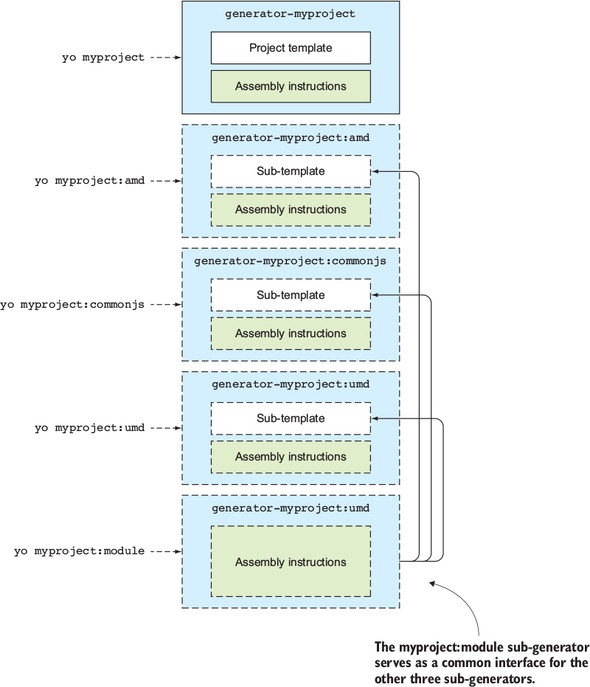
Let’s do that directly in code. First, you refactor your module generators into three similar-looking sub-generators for AMD, UMD, and CommonJS, as shown in the following listing.
In the previous chapter you learned about modules. Modules are encapsulated and reusable pieces of code. In JavaScript, they need to follow a certain pattern: AMD, UMD, or CommonJS. The longer you work on a JavaScript app, the more modules you will add to it—modules you create over time. For each module you have to do the following: