concept configuration in category javascript

This is an excerpt from Manning's book Data Wrangling with JavaScript.
This creates a barebones Vagrantfile in the current directory. Edit this file to change the configuration and setup for your virtual machine.
The only configuration we have at the moment is the socket server setup details from listing 12.2b. We’re going to move these to a separate configuration file, as shown in figure 12.10. This will be a central place to consolidate the configuration of the app and where we’ll need to go to later change its configuration.
Listing 12.3b shows how we load and use the configuration file. Nothing is complex here; our configuration is a regular Node.js code module with exported variables. This is a simple and convenient way to get started adding configuration to your app. It costs us little time to get this in place, and it’s useful in the long run.
Listing 12.3b The Node.js server is modified to load and use the configuration file (listing-12.3/server/index.js)
const net = require('net');
const config = require('./config.js');    #1

const server = net.createServer(socket => {
    // ... code omitted, same as listing 12.1b ...
});

server.listen(config.server.portNo, config.server.hostName, () => {    #2
    console.log("Waiting for clients to connect.");
});

#1   Loads the configuration file just like any other Node.js code module
#2   Starts the socket server with details loaded from the configuration file

This is an excerpt from Manning's book JavaScript on Things: Hacking hardware for web developers.
Create a file called Rover.js (listing 6.5). This module will hold a JavaScript class that defines the rover’s basic movements. Rover doesn’t know about the specific pins or the configuration of the motors in the Motors object passed to its constructor; those details are abstracted away.
The configuration and workflow is similar to the Pico in that there’s an IDE for configuring, authoring, and deploying. If you have an Element on hand, you can head over to the quick-start guide for details (http://mng.bz/84cS), but these are the general steps:
Now edit the configuration: $ sudo vi /etc/samba/smb.conf

This is an excerpt from Manning's book Front-End Tooling with Gulp, Bower, and Yeoman.
Figure 7.1. The original problem. You want to compile different JavaScript bundles. Some are written in CoffeeScript, some in JavaScript, and some bundles even need both. The process is roughly the same, but the input type has a significant effect on choices in the process. Instead of copying the same build pipeline again and again, you want to create just one that can handle all inputs and configurations.


This is an excerpt from Manning's book JavaScript Application Design: A Build First Approach.
Listing 2.5. Configuring the concatenation task
grunt.initConfig({ concat: { #1 js: { #2 files: { 'build/js/bundle.js': 'public/js/**/*.js' #3 } } } }); #1: concat property indicates you’re configuring the concat task. #2: Inside the concat object, each property indicates configuration for a task target. #3: Output will be written to 'build/js/bundle.js', taking the globbing pattern 'public/js/**/*.js' as source.
The configuration is an object you can pass to grunt.initConfig. Almost every Grunt task needs configuration. As you progress through the rest of this chapter, you’ll see how to set up the configuration in each case. To compile LESS files with Grunt so you can serve CSS directly, you’re going to use the grunt-contrib-less package. Remember when you installed the JSHint plugin? Same thing here! Only the package name changes, because you’re going to use a different plugin now. To install it, run the following in your terminal:
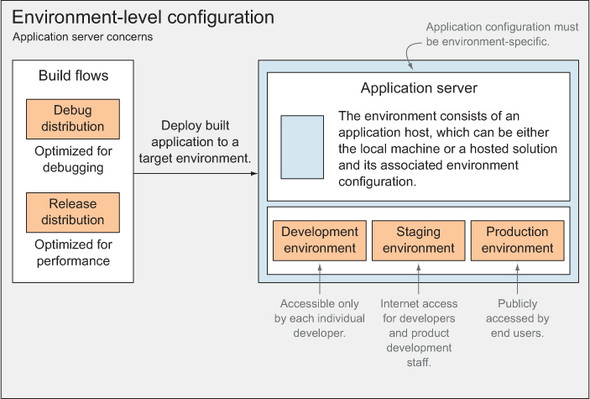
I’ve also participated in endeavors where configuration was tediously manual: you’d get a brand new code base, ask around for a few credentials to get started, and type them into a single configuration file. If you had to deploy, then you’d manually change those same values again to whatever configuration that satisfied the environment you were deploying to. In the previous case, at least you didn’t have to change configuration around to get your application to work any time you changed environments. You’d change a magic string, setting it to something such as “staging,” and it’d work.
In encrypted files; it’s meant to distribute configuration securely.