concept editor in category javascript

This is an excerpt from Manning's book Prototype and Scriptaculous in Action.
Once we’ve got an editor on our page, we will want to exert some control over it with our code. If you store a reference to the editor instance, like this,
var inPlaceEditor = new Ajax.InPlaceEditor( ...you will be able to use scripts to control the activity of the editor.
For example, if you need to force the editor into active mode, you can do so with the editor’s enterEditMode() function, as shown in the following code snippet:
The page you will see is quite simple, consisting of a label, “Email address:”, and a <span> element, which is the target element for the InPlaceEditor. Figure 6.7 shows this page when the editor is active.
In this example, the text typed into the text box will be validated by a server-side resource. If the entry passes validation, the editor will revert to display mode as expected. However, if the entry fails validation, the server will indicate that, and our code will place a new style class on the text, showing the user that the entry is not valid. Sounds simple enough! The code for the page is shown in listing 6.5.
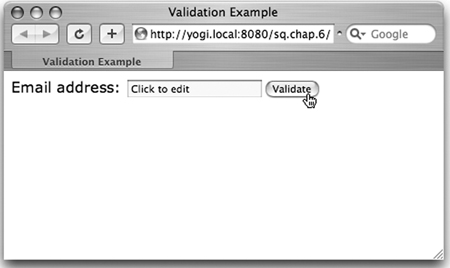
Table 6.1. The Ajax.InPlaceEditor options
Description
okButton A Boolean value indicating whether or not an OK button is to be shown. Defaults to true. okText The text to be placed on the OK button. Defaults to “OK”. cancelLink A Boolean value indicating whether a cancel link should be displayed. Defaults to true. cancelText The text of the cancel link. Defaults to “cancel”. savingText A text string displayed as the value of the control while the save operation (the request initiated by clicking the OK button) is processing. Defaults to “Saving...”. clickToEditText The text string that appears as the control’s tooltip upon mouse-over. Appearance options rows The number of rows that will be displayed when the edit control is active. Any number greater than 1 causes a text area element to be used rather than a text field element. Defaults to 1. cols The number of columns displayed when in active mode. If omitted, no column limit is imposed. size Same as cols but only applies when rows is 1. highlightcolor The color to apply to the background of the text element upon mouse-over. Defaults to a pale yellow. highlightendcolor The color that the highlight color fades to as an effect. Note that some browsers don’t entirely support this option. loadingText The text to appear within the control during a load operation. (We’ll be looking at that option shortly.) The default is “Loading...”. savingClassName The CSS class name applied to the element while the save operation is in progress. This class is applied when the request to the saving URL is made, and it is removed when the response is returned. The default value is “inplaceeditor-saving”. CSS styling and DOM ID options formClassName The CSS class name applied to the form created to contain the editor element. Defaults to “inplaceeditor-form”. formId The ID applied to the form created to contain the editor element. Callback options callback A JavaScript function that is called just prior to submitting the save request in order to obtain the query string to be sent to the request. The default function returns a query string equating the query parameter value to the value in the text control onComplete A JavaScript function that is called upon successful completion of the save request. The default applies a highlight effect to the editor. onFailure A JavaScript function that is called upon the failure of the save request. The default issues an alert showing the failure message. loadTextURL The URL of a server-side resource to be contacted in order to load the initial value of the editor when it enters active mode. By default, no back-end load operation takes place, and the initial value is the text of the target element. Other options externalControl An element that is to serve as an external control that triggers the editor into active mode. This is useful if you want another button or other element to trigger editing the control. ajaxOptions A hash object that will be passed to the underlying Prototype Ajax object to use as its options hash.