concept environment in category javascript

This is an excerpt from Manning's book Deep Learning with JavaScript: Neural networks in TensorFlow.js.
The nice things about using synthesized data are 1) the true label values are automatically known, and 2) we can generate as much data as we want. Every time we generate a scene image, the type of the object and its bounding box are automatically available to us from the generation process. So, there is no need for any labor-intensive labeling of the training images. This very efficient process in which the input features and labels are synthesized together is used in many testing and prototyping environments for deep-learning models and is a technique you should be familiar with. However, training object-detection models meant for real-life image inputs requires manually labeled real scenes. Luckily, there are such labeled datasets available. The Common Object in Context (COCO) dataset is one of them (see http://cocodataset.org).
Figure 11.2. A schematic diagram of the basic formulation of RL problems. At each time step, an agent selects an action from the set of possible actions, which causes a change in the state of the environment. The environment provides the agent with a reward according to its current state and the action selected. The state of the environment is fully or partially observed by the agent, which will use that state to make decisions about future actions.
![]()
How to deploy TensorFlow.js models to various platforms and environments, ranging from browser extensions to mobile apps, and from desktop apps to single-board computers

This is an excerpt from Manning's book Secrets of the JavaScript Ninja, Second Edition.
These days, JavaScript applications can be executed in many environments. But the environment from which it all began, the environment from which all other environments have taken ideas, and the environment on which we’ll focus, is the browser. The browser provides various concepts and APIs to thoroughly explore; see figure 1.1.
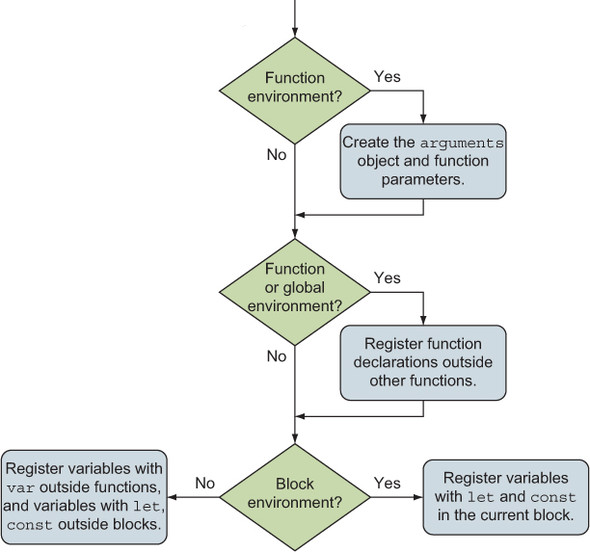
Whenever a function is called, a new function execution context is created and pushed onto the execution context stack. In addition, a new associated lexical environment is created. Now comes the crucial part: For the outer environment of the newly created lexical environment, the JavaScript engine puts the environment referenced by the called function’s internal [[Environment]] property, the environment in which the now-called function was created!
In our case, when the skulk function is called, the outer environment of the newly created skulk environment becomes the global environment (because it’s the environment in which the skulk function was created). Similarly, when calling the report function, the outer environment of the newly created report environment is set to the skulk environment.

This is an excerpt from Manning's book JavaScript Application Design: A Build First Approach.
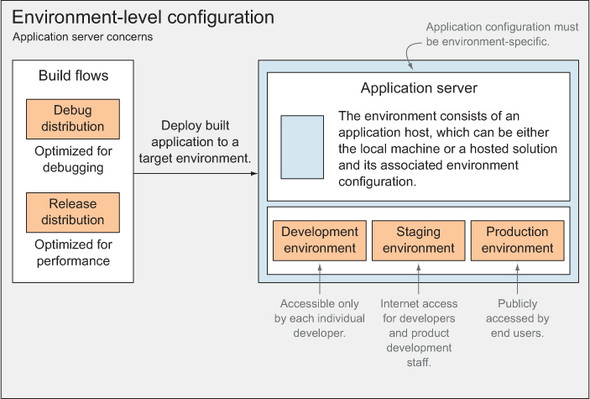
Deployment and Environment: These are concerned with automating the release process and configuring the different hosted environments. The deployment process is in charge of delivering your changes to the hosted environment, while environment configuration defines the environment and the services—or databases—it interacts with, at a high level.
Understanding the interaction between development, staging, and production environments and build distributions is vital to creating a build process that can be used regardless of environment, allowing you to develop your application in a setting loyal to what your end users will see, but that can still be debugged with ease. Additionally, this understanding will allow you to create middle-tier environments, which are instrumental to robust deployment mechanisms, which we’ll discuss in the next chapter.
In this chapter we’ll start off learning what we mean by environments and distributions, and I’ll propose a typical configuration that should suffice for most use cases, where you’ll have your

This is an excerpt from Manning's book Single Page Web Applications: JavaScript end-to-end.
Let’s adjust our application to adjust itself to the environment being provided. We want to use the bodyParser and methodOverride middleware in every environment. In the development environment we would like the application to log HTTP requests and detailed errors. In the production environment we only want to log error summaries, as shown in listing 7.11. Changes are shown in bold: