concept Google in category javascript

This is an excerpt from Manning's book Single Page Web Applications: JavaScript end-to-end.
Feature modules are a lot like third-party modules, which provide all sorts of capabilities to modern websites.[2] Example third-party modules include blog commenting (DisQus, or LiveFyre), advertising (DoubleClick or ValueClick), analytics (Google or Overture), sharing (AddThis or ShareThis), and social services (Facebook “Like” or Google “+1” buttons). They’re enormously popular because website operators can add high-quality features to their sites at a tiny fraction of the cost, effort, and maintenance than if they were to develop the features themselves.[3] Typically, third-party modules are added to a website by including a script tag in a static web page, or adding a function invocation to an SPA. Many features on many websites wouldn’t be possible were it not for third-party modules, as the costs would otherwise be prohibitive.
We need to adjust our SPA so that users can use Google and other search engines to find what they need. Our web server needs to interact with the crawler robots that index our content differently because the crawlers don’t execute the JavaScript our SPA uses to generate the content. We also want to use analytics tools. On a traditional website, analytics data is typically collected through a JavaScript snippet added to every HTML page. Because all of the HTML in an SPA is generated by JavaScript, we need a different approach.
When Google indexes a traditional website, its web crawler (called a Googlebot) first scans and indexes the content of the top-level URI (for example, www.myhome.com). Once this is complete, it then it follows all of the links on that page and indexes those pages as well. It then follows the links on the subsequent pages, and so on. Eventually it indexes all the content on the site and associated domains.
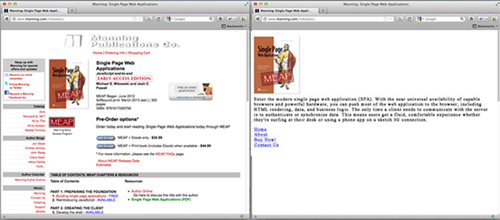
For the home page of our site, what does a crawler-optimized page look like? It’s probably our logo or other primary image we’d like appearing in search results, some SEO-optimized text explaining what the application does, and a list of HTML links to only those pages we want Google to index. What the page doesn’t have is any CSS styling or complex HTML structure applied to it. Nor does it have any JavaScript, or links to areas of the site we don’t want Google to index (like legal disclaimer pages or other pages we don’t want people to enter through a Google search). Figure 9.1 shows how a page might be presented to a browser and to the crawler.
The links on the page aren’t followed by the crawler the same way a person follows links because we apply the special characters #! (pronounced hash bang) in our URI anchor component. For instance, if in our SPA a link to the user page looks like /index.htm#!page=user:id,123, the crawler would see the #! and know to look for a web page with the URI /index.htm?_escaped_fragment_=page=user:id,123. Knowing that the crawler will follow the pattern and look for this URI, we can program the server to respond to that request with an HTML snapshot of the page that would normally be rendered by JavaScript in the browser. That snapshot will be indexed by Google, but anyone clicking on our listing in Google search results will be taken to /index.htm#!page=user:id,123. The SPA JavaScript will take over from there and render the page as expected.
This provides SPA developers with the opportunity to tailor their site specifically for Google and specifically for users. Instead of having to write text that’s both legible and attractive to a person and understandable by a crawler, pages can be optimized for each without worrying about the other. The crawler’s path through our site can be controlled, allowing us to direct people from Google search results to a specific set of entrance pages. This will require more work on the part of the engineer to develop, but it can have big pay-offs in terms of search result position and customer retention.