concept length in category javascript

This is an excerpt from Manning's book Secrets of the JavaScript Ninja, Second Edition.
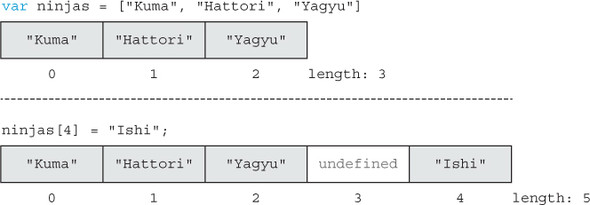
Regardless of how we create it, each array has a length property that specifies the size of the array. For example, the length of the ninjas array is 3, and it contains 3 ninjas. We can test this with the following assertions:
the array will expand to accommodate the new situation. For example, see figure 9.1: We’ve essentially created a hole in the array, and the item at index 3 is undefined. This also changes the value of the length property, which now reports a value of 5, even though one array item is undefined.
Unlike in most other languages, in JavaScript, arrays also exhibit a peculiar feature related to the length property: Nothing stops us from manually changing its value. Setting a value higher than the current length will expand the array with undefined items, whereas setting the value to a lower value will trim the array, as in ninjas.length = 2;.
Listing 14.2. A polyfill for the Array.prototype.find method
if (!Array.prototype.find) { #A Array.prototype.find = function(predicate) { #B if (this === null) { throw new TypeError('find called on null or undefined'); } if (typeof predicate !== 'function') { throw new TypeError('predicate must be a function'); } var list = Object(this); var length = list.length >>> 0; #C var thisArg = arguments[1]; var value; for (var i = 0; i < length; i++) { #D value = list[i]; #D if (predicate.call(thisArg, value, i, list)) { #D return value; #D } #D } #D return undefined; }; } #A - Provides a polyfill only if the current browser doesn’t implement the method #B - Specifies our own implementation #C - Makes sure that length is a non-negative integer #D - Finds the first array item that satisfies a predicate !@%STYLE%@! {"css":"{\"css\": \"font-weight: bold;\"}","target":"[]"} !@%STYLE%@!

This is an excerpt from Manning's book Prototype and Scriptaculous in Action.
Table 4.2. Optional properties of the Ajax.Updater object
Default value
Comments
frequency 2 Frequency of automatic update of the content, measured in seconds. decay 1 Decay in frequency of updates when the received response is the same as the previous response. Set to a value less than 1 to increase the frequency on successive polls, or greater than 1 to decrease the frequency (i.e., increase the length of time between updates).
Snippet 10.32.
var lengths=[300,50,90];
var widths=[200,250,20];
var locations=["downtown","out west","middle of nowhere"];
var plots=lengths.zip(widths,locations,
  function(value){
    return { length: value[0], width: value[1], location: value[2] };
  }
);

show("plots",plots);
show("first plot",plots[0]);
show("second plot",plots[1]);
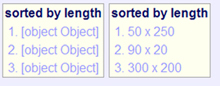
The sortBy() method allows us to sort complex objects as if they were simple numerics. It accepts an iterator function as an argument, which should return a ranking for that object. Once a rank for each object has been established, the native sort() method is used to order the Array by ranking. Snippet 10.35 illustrates how sortBy() can be used to order our plots of land by length.
Snippet 10.35.
var plots=[
  { length: 300, width: 200 },
  { length: 50, width: 250 },
  { length: 90, width: 20 }
];

var sorted=plots.sortBy(
  function(value,index){
    return value.length;
  }
);

show("sorted by length",sorted);
show("sorted by length",
  sorted.collect(
    function(value,index){
      return value.length+" x "+value.width
    }
  )
);
The length property of the Array object should be familiar to programmers of C-style languages. Used in the conventional way, it allows us to iterate through the members of an Array. Snippet 10.1 illustrates this for a simple array of Strings (each of which describes the name of a type of cloud—unlikely to be something you’d encounter in your own web application, but the words have a nice sound to them!).