concept local autocompleter in category javascript

This is an excerpt from Manning's book Prototype and Scriptaculous in Action.
There are times when you want to use a control similar in functionality to the Ajax autocompleter but with a backing data set that is small enough to upload to the client as part of the page load. For just such occasions, Scriptaculous makes available the local autocompleter control. As we will see, the local autocompleter shares a lot of characteristics with the Ajax autocompleter (and behind the scenes, a lot of code as well). But before just assuming that a local autocompleter will be faster than a remote one, be sure to test that supposition!
The local autocompleter must perform frequent calculations over what may still be a large data set, and in an environment that is usually not quite as swift as its server-side counterpart. You may find that there are occasions when any network delay experienced when using a remotely fed autocompleter may actually be faster than sorting through a large set of data on the client machine. So don’t assume—test!
Creating a local autocompleter is almost identical to creating an Ajax autocompleter, which we did in section 6.4.1. The same type of constructor is used with almost the same parameters, and the HTML elements that the created autocompleter will manipulate must follow the same stringent rules. The major difference lies in how the backing data set used for autocompletion is identified to the control.
With an Ajax autocompleter, we supplied the URL of a server-side resource that would perform the necessary filtering, given the user input, and that would return only the data elements that matched. With a local autocompleter, we instead supply the full list of data elements as a JavaScript String array, and the control itself performs the filtering operation within its own client code. No server interaction whatsoever takes place (except for the initial loading of the page, of course).
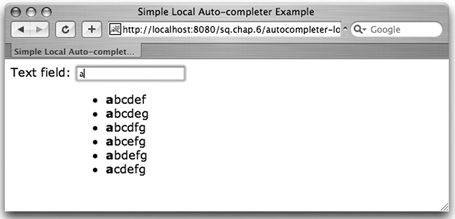
An example of using the local autocompleter is shown in listing 6.13, and it can be found using the control panel for this chapter’s code or by visiting the page at autocompleter-local/simple-example.html.
Listing 6.13. A simple example of a local autocompleter
<html> <head> <title>Simple Local Autocompleter Example</title> <script type="text/javascript" src="../scripts/prototype.js"></script> <script type="text/javascript" src="../scripts/scriptaculous.js"></script> <script type="text/javascript"> window.onload = function() { new Autocompleter.Local( 'autoCompleteTextField', 'autoCompleteMenu', ['abcdef','abcdeg','abcdfg','abcefg','abdefg','acdefg'], {} ); } </script> </head> <body> <div> <label>Text field:</label> <input type="text" id="autoCompleteTextField"/> <div id="autoCompleteMenu"></div> </div> </body> </html>