concept Node in category javascript

This is an excerpt from Manning's book Testing JavaScript Applications.
Listing 2.4. Cart.js
class Cart {
  constructor() {
    this.items = [];
  }

  addToCart(item) {
    this.items.push(item);
  }

  removeFromCart(item) {
    for (let i = 0; i < this.items.length; i++) {
      const currentItem = this.items[i];
      if (currentItem === item) {
        this.items.splice(i, 1);
      }
    }
  }
}

module.exports = Cart;
In this chapter, I’ll teach you testing techniques to help you make your back-end tests quick, reliable, and easy to update while still preserving the quality of your bug detection mechanisms.
Listing 5.1. countModule.js
const fs = require("fs");
const filepath = "./state.txt";

const getState = () => parseInt(fs.readFileSync(filepath), 10);  #1
const setState = n => fs.writeFileSync(filepath, n);  #2
const increment = () => fs.writeFileSync(filepath, getState() + 1);  #3
const decrement = () => fs.writeFileSync(filepath, getState() - 1);  #4

module.exports = { getState, setState, increment, decrement };
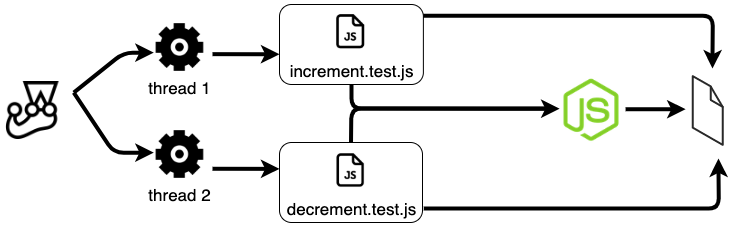
To validate this module, write two tests, one to increment the file’s count and the other to decrement it. For these tests to run in parallel, separate each test into a file of its own. Each test should reset the count, manipulate it through the exposed functions and check the final count.
Listing 5.2. increment.test.js
Figure 5.1. Both tests using the same module and the same underlying resource.
Tip

This is an excerpt from Manning's book Node.js in Practice.
Sometimes you just want to know how to do something that seems like it should be easy, but isn’t. Other times you think you might have found a serious bug in Node. Whatever the situation, when you need help that isn’t satisfied by Node’s API documentation, there are several official channels you can use.

Node supports TLS by allowing TCP servers to be created that support several ciphers. The TCP server itself inherits from net.Server—once you’ve got your head around TCP clients and servers in Node, encrypted connections are just an extension of these principles.
A solid understanding of TLS is important if you want to deploy web applications with Node. People are increasingly concerned with security and privacy, and unfortunately SSL/TLS is designed in such a way that programmer error can cause security weaknesses.
There’s one final aspect of networking in Node that we’d like to introduce before we move on to the techniques for this chapter: how Node is able to give you asynchronous APIs to networking technologies that are sometimes blocking at the system level.