concept place in category javascript

This is an excerpt from Manning's book Front-End Tooling with Gulp, Bower, and Yeoman.
With your watch processes in place, you can now trigger incremental builds with each iteration of your original source files.
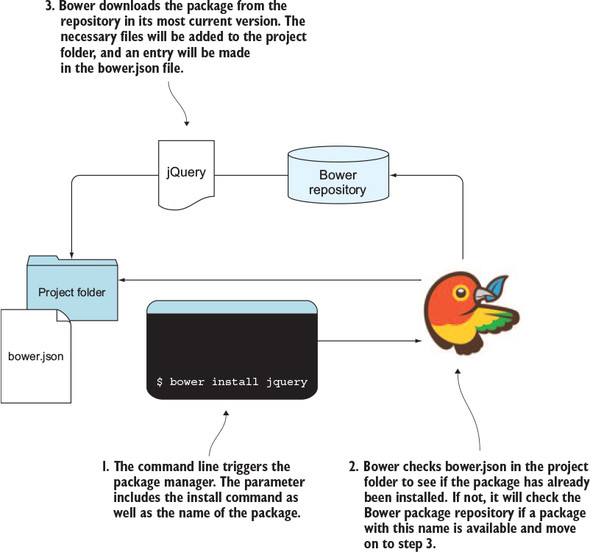
Figure 4.7. The installation process of a single component. With the command given to install jQuery, Bower will check for the most current version and add it to the project. An entry with both the component name and the version number will be made in the metadata file. The same process takes place with an update, with the original files being replaced with the new ones.

This is an excerpt from Manning's book Prototype and Scriptaculous in Action.
The features that we’ve discussed so far are frameworks that can be used to enhance a coder’s application. Scriptaculous also provides a number of complete widgets, in the Components library. At the time of writing, the Components library contains two components: the AutoCompleter can attach a predictive drop-down element to any text field, which can endow an ordinary HTML Form element with features similar to Google Suggest; the in-place editor allows any DOM element to transform itself into a text input field and back again.
In this chapter, we’ll take a look at three control types that Scriptaculous makes available: in-place editors, autocompleters, and sliders.
We’ll start our journey into extended controls with “in-place editors.” Let’s look at what is meant by an in-place editor and how it will be useful on our pages.