concept request in category javascript

This is an excerpt from Manning's book Testing JavaScript Applications.
Note
It’s not a problem to expose parts of your code just for the sake of testing, even if your application code doesn’t need those parts to be exposed.
$ npm install knex sqlite3

This is an excerpt from Manning's book JavaScript Application Design: A Build First Approach.
I can’t stress enough how important a role asset bundling, minification, and even spriting play when it comes to release builds. Images typically make up most of the footprint for web applications today. Reducing the number of requests to your server using these techniques provides you with an immediate performance boost that doesn’t require more expensive hardware. A similar case can be made for reducing the byte size of the responses by minifying and/or compressing them.
Let’s look at the following listing (found as ch06/02_requests-upon-requests in the samples) to see how this AJAX-fest might look.

This is an excerpt from Manning's book Node.js in Practice.
The interesting thing about the listener callback passed to http.createServer is that it behaves much like the listener passed to net.createServer. Indeed, the mechanism is the same—we’re creating TCP sockets, but layering HTTP on top. The main conceptual difference between the HTTP protocol and TCP socket communication is a question of state: HTTP is a stateless protocol. It’s perfectly acceptable and in fact typical to create and tear down TCP sockets per request. This partly explains why Node’s underlying HTTP implementation is low-level C++ and C: it needs to be fast and use as little memory as possible.
Because this centralizes error handling into the main application file, it’s a good idea to conditionally return different formats. This is useful if your application provides a JSON API as well as HTML pages. You can use app.format to do this
, and it works by checking the MIME type in the request’s Accept header. The JSON response might not be needed, but it’s possible that your API would return well-formed errors that can be consumed by clients—it can be difficult to deal with APIs that suddenly respond with HTML when you’re asking for JSON.
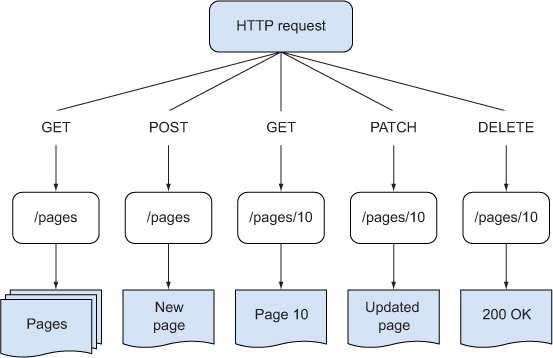
To get started building REST APIs, you should consider what your objects are. Imagine you’re building a content management system: it probably has pages, users, and images. If you want to add a button that allows pages to be toggled between “published” and “draft,” and if you’ve already got a REST API and it supports requests to PATCH /pages/:id, you could just tie the button to some client-side JavaScript or a form that posts to /pages/:id with { state: 'published' } or { state: 'draft' }. If you’ve been given an Express application that only has PUT /pages/:id, then you could probably derive the code for PATCH from the existing implementation.

This is an excerpt from Manning's book CORS in Action: Creating and consuming cross-origin APIs.
Once the request is set up, you send the request to the server using the send method:
xhr.send();This method initiates the HTTP request to the server. Chrome’s Network tab gives you a better understanding of what the request looks like, as shown in figure 1.3. The figure shows the fact that even though the request originates from the filesystem
, the destination server is in fact flickr.com
.
The request to load the blog posts, shown in the bottom row, is a failing request.
The Network tab also provides additional information about the request, also shown in figure 7.4. This includes information such as the HTTP method, the HTTP status, the content type of the request, the location on the page that initiated the request, the size of the response, and the time it takes to load the response.
Right clicking a column can configure the view to show and hide additional bits of information. There are two additional columns that are hidden by default, but can be useful when debugging CORS requests. The Remote Address column indicates the server the request is going to, and can be useful for identifying cross-origin requests; the Vary column indicates the value of the Vary header (as you learned in chapter 6, the Vary header indicates which header values should be taken into account when calculating caching resources).
Clicking the request reveals even more detailed information, such as the request and response headers, as shown in figure 7.5. When debugging CORS requests, it’s important to pay special attention to any CORS-specific headers, such as the Origin header and any header prefixed with Access-Control.
The Network tab provides more insight into why the request is failing. The HTTP method is OPTIONS, which means that the preflight request is failing. Because the preflight request fails, the actual request is never issued. This is verified by the fact that you don’t see a second GET request to load the blog posts. By inspecting the HTTP headers, you can see that although the request has an Access-Control-Request-Headers: timezone-offset, sample-source header, the server responds with Access-Control-Allow-Headers: Timezone-Offset, and is missing the Sample-Source header.
Now that we’ve diagnosed the root cause of this issue, there are a few ways to proceed. If the request header is expected and valid, the server configuration can be updated to allow the request header. But this only works if you have control over the server configuration (as you do in this sample). If you’re making requests against a server you don’t have control over (for example, if you’re querying a third-party API built by a different company), your options are more limited. You can remove the Sample-Source header from the client. That is easy in this particular case, because the Sample-Source header doesn’t do anything. But if the request header is important to the request, you may need to reach out to the server owner and ask them to allow your particular header. Table 7.1 explores ways to fix this issue.
Table 7.1. CORS issue can either be fixed in the client code or the server code
In the client code
In the server code
xhr.setRequestHeader(
'Timezone-Offset',
new Date().getTimezoneOffset());
xhr.setRequestHeader(
'Sample-Source',
'CORS in Action');var corsOptions = {
...
allowHeaders: [
'Timezone-Offset',
'Sample-Source']
};Remove the disallowed header from the request Add the failing header to the allowHeaders whitelist (only works if you can change the server code)

Setting the Origin header is useful when you want to test an Origin but don’t want to host a page on that origin. For example, the preceding command tested a request from http://localhost:1111 without having to upload and run code on the actual http://localhost:1111 site. The following command changes the Origin to a null value to mimic a request from a file:
curl --verbose -H "Origin: null" http://127.0.0.1:9999/api/postsIf you run this command, you’ll see an Access-Control-Allow-Origin header in the response. This is because the null value is in the origin whitelist. The -H command can be used to add any request header. If you want to mimic a request from Firefox, you could add Firefox’s User-Agent header to the request.
The first way to use test-cors.org is to send cross-origin requests to a remote server. This is similar to how curl works, but it makes its request from the browser using an XMLHttpRequest object, rather than the command line. This can be helpful because it makes an HTTP request the same way you’d expect a client. For example, curl will let you add a Host header to the request. But the Host header can’t be set from test-cors.org, because the browser controls this header.
To use test-cors.org to send a request to your sample server, begin by recreating the request to /api/posts in the client panel. This is a GET request that includes cookies and has the Timezone-Offset and Sample-Source headers set. Next, choose the Remote tab in the response panel (if it’s not already selected) and enter http://127.0.0.1:9999/api/posts in the Remote URL textbox.
If you click the Send Request button, it will send the request to your test server. Figure 7.16 shows an example of what the page should look like.
It may seem odd that the test-cors.org website, which lives on a different server, can access your local server at 127.0.0.1:9999. But remember that test-cors.org makes requests from the browser, so the test-cors.org server itself isn’t involved in the request. Since the JavaScript code is running on your computer, it can make requests to localhost.


This is an excerpt from Manning's book Prototype and Scriptaculous in Action.
Now on to the biggest improvement in the coding—making the request. The Ajax.Request object takes two arguments in its constructor
. The first is the URL on the server, and the second is a JavaScript object stuffed full of optional arguments. (We’ll see this idiom a lot throughout this book, in the predefined objects and in our own code.) We specify the HTTP method as POST, and pass in our querystring. Details such as MIME type will be taken care of for us.
We also add in two callback handlers. Ajax.Request allows us to define suitably high-level callbacks, for success and failure of the request
. Note that we’re using Function.bind() here. Like bindAsEventListener(), this simply ensures that when the callback is invoked, it will have the context object that we want it to have.
We no longer need to write a callback that will be invoked multiple times during the request, because in this simple case, we don’t need to. Prototype handles all that and the HTTP response codes for us. Compared to listing 1.2, tellServer() has shrunk by at least 50 percent, and we’ve gotten rid of onReadyState() altogether.
In practical terms, something is always returned to the client (which is sometimes termed the user agent) as a response to the request. It may be a direct response, such as a requested document, or an indirect response, such as a document containing the results of an operation.
A direct response simply returns a resource that was requested: the aforementioned pet photo, for example, or an HTML document, or perhaps even a CSS stylesheet. The request asks for the pet photo or other resource, and the response provides it.
In an indirect response, the returned response is a result of the actual satisfaction of the request, not the resource itself. For example, the request could have been to perform an action that causes a database to be updated, perhaps supplying some data to go with the request. The response would return the results of that action; perhaps an HTML page denoting success or failure, but at minimum a status code is always returned.
Using the Prototype Ajax.Request object in a capable browser, such as Firefox, we could make an Ajax request to a server-side resource using the DELETE method as shown in listing A.1.