concept string in category javascript

This is an excerpt from Manning's book Testing JavaScript Applications.
First, your test sets up a scenario by adding cheesecake to the cart. Then it calls the function you want to test (in this case,
removeFromCart). Finally, it checks whether the content of the cart matches what you expected it to be. Again, the same formula: set-up, execution, and verification. This sequence is also known as the 3A’s pattern: arrange, act, assert.
In case you want to update the back-end yourself, within the
serverfolder there’s aREADME.mdfile which details all the changes I’ve had to do to the application built in chapter four.
Listing 7.13. App.test.js
import { App } from "./App.jsx";

const root = document.createElement("div");  #1
document.body.appendChild(container);  #2
This is an excerpt from Manning's book The Joy of JavaScript.
Functions are first-class because you can use them as arguments as well as return values. To illustrate this principle, let’s tackle another problem in our application. Suppose we’ve been able to create a few blocks in the chain and serialized a JSON representation of the blockchain to a text file. Let’s create a simple program countBlocksInFile that reads the number of blocks created given the name of the file. Stopping to think about it for a second, we can identify four main tasks: reading the raw file into a buffer, decoding it into a string, parsing the block’s JSON array into an array object, and computing its length. Sounds fairly easy, here’s a diagram of the tasks involved:
const block: Block = new Block(1, '0'.repeat(64), ['a', 'b', 'c'], 2)

whereas this one issues a type warning:

const block: Block = new Block('1', '0'.repeat(64), ['a', 'b', 'c'], 2)

Cannot call Block with '1' bound to index because string is incompatible with number.
As you can see, the type checker correctly prevents me from using string in place of number in the constructor. Classes like Block naturally become type and will be processed by Flow accordingly. Let’s take a look at interface types.
Figure 10.1 Shows the sequence of map calls and traces the flow of types to find an invalid operation (exponentiation) being performed on a string
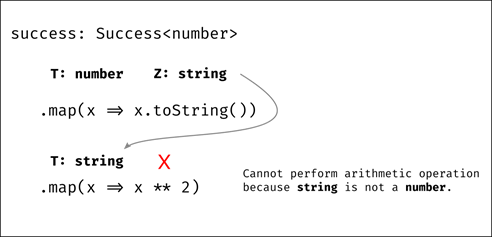
As you can see in figure 10.1, after converting the value to a string on the first call to map, the second call fails because x gets bound to string before attempting to perform arithmetic.
This is an excerpt from Manning's book Get Programming with JavaScript Next: New features of ECMAScript 2015, 2016, and beyond.
The claim that primitives, like strings and numbers, are immutable may be a tough pill to swallow if you aren’t already familiar with it. You may be thinking something like “I use primitives and change their value all the time!” The fact is that with the ability to reassign variables with new values, primitives are harder to spot. Consider this code:
Padding a string means specifying how long you want the string to be, and filling the string with a pad character until it is that length. For example, in the priming exercise, you wanted the minutes to always be two characters long. Sometimes it was (such as 36) but other times it wasn’t (such as 5). By padding the string to a length of 2 with the pad character being 0, 36 would be unchanged because it is already two chars while 5 would become either 05 or 50 depending on whether you were padding left or right.

This is an excerpt from Manning's book Secrets of the JavaScript Ninja, Second Edition.
Listing 3.8. Tackling default parameters before ES6
function performAction(ninja, action){ action = typeof action === "undefined" ? "skulking" : action; #A return ninja + " " + action; } assert(performAction("Fuma") === "Fuma skulking", #B "The default value is used for Fuma"); #B #B assert(performAction("Yoshi") === "Yoshi skulking", #B "The default value is used for Yoshi"); #B assert(performAction("Hattori") === "Hattori skulking", #B "The default value is used for Hattori"); #B assert(performAction("Yagyu", "sneaking") === "Yagyu sneaking", #C "Yagyu can do whatever he pleases, even sneak!"); #C #A - If the action parameter is undefined, we use a default value, skulking, and if it’s defined, we keep the passed-in value. #B - We haven’t passed in a second argument, the value of the action parameter; after executing the first function, the body statement will default to skulking. #C - Pass a string as the value of the action parameter; that value will be used throughout the function body. !@%STYLE%@! {"css":"{\"css\": \"font-weight: bold;\"}","target":"[]"} !@%STYLE%@!
Figure 9.13. Running the code from listing 9.15 shows that objects are converted to strings if we try to use them as object properties.
Regular expressions trivialize the process of tearing apart strings and looking for information. Everywhere you look in mainstream JavaScript libraries, you’ll see the prevalent use of regular expressions for various spot tasks:
Manipulating strings of HTML nodes
Let’s create a function that, given a string, verifies that the U.S. Postal Service will stay happy. We could resort to performing a comparison on each character, but we’re a ninja and that’s too inelegant a solution, resulting in a lot of needless repetition. Rather, consider the following solution.
Listing 10.1. Testing for a specific pattern in a string
function isThisAZipCode(candidate) { if (typeof candidate !== "string" || #A candidate.length != 10) return false; #A for (let n = 0; n < candidate.length; n++) { let c = candidate[n]; switch (n) { #B case 0: case 1: case 2: case 3: case 4: case 6: case 7: case 8: case 9: if (c < '0' || c > '9') return false; break; case 5: if (c != '-') return false; break; } } return true; #C } #A - Short-circuits obviously bogus candidates #B - Performs tests based on character index #C - If all succeeds, we’re good! !@%STYLE%@! {"css":"{\"css\": \"font-weight: bold;\"}","target":"[]"} !@%STYLE%@!
The term regular expression stems from mid-century mathematics, when a mathematician named Stephen Kleene described models of computational automata as “regular sets.” But that won’t help us understand anything about regular expressions, so let’s simplify things and say that a regular expression is a way to express a pattern for matching strings of text. The expression itself consists of terms and operators that allow us to define these patterns. We’ll see what those terms and operators consist of shortly.

This is an excerpt from Manning's book Prototype and Scriptaculous in Action.
JavaScript is a general-purpose programming language. As an Ajax developer, you’ll generally be using Prototype inside a web browser, but certain parts of it, such as objects, features, arrays, strings, and numbers, are designed to enhance the JavaScript language itself.
Data such as a list of movie titles would be kept in a database or in files on the filesystem. However, in order to keep these examples focused on the current subject matter, the servlet will obtain the list of possible choices from a string hard-coded into the program itself. Do not take this as an endorsement of this approach; it is used here only for demonstration purposes.
When the fullSearch option is enabled the typed text is matched anywhere within the candidate string—not only at the beginning of the strings, and not only at the beginnings of words within the strings.
Set partialChars back to 2 (or clear its field), enable the fullSearch option, and create a new autocompleter. Clear the autocomplete field and type in “day” once again. Not only do we now get the set of choices we saw before (those that begin with “day” or contain words beginning with “day”), but we also get choices with “day” anywhere within the string, such as “Friday the 13th.”