concept variable in category javascript

This is an excerpt from Manning's book Get Programming with JavaScript Next: New features of ECMAScript 2015, 2016, and beyond.
Did you spot the bug? Since the variables aren’t scoped to the for statement, each iteration is using the same variables. Here’s the breakdown of what’s going on:
Variables declared with let and var both have a behavior called hoisting. This means that within the entire scope of where the variable is declared, whether the entire block for let or the entire function for var, the variable consumes the entire scope. This happens no matter where in the scope the variable is declared:
if (condition) {
  // ------ scope of myData starts here -----
  doSomePrework();
  //... more code
  let myData = getData();
  //... more code
  doSomePostwork();
  // ------ scope of myData ends here -----
}
This means that in this section of code, the variable is in scope and can be accessed even before it is declared! This is true and somewhat counterintuitive if another variable by the same name exists just outside the scope. Consider this example:
// ------ scope of outer myData starts here -----
let myData = getDefaultData();
if (condition) {
  // ------ scope of inner myData starts here -----
  doSomePrework(myData); // <-- What variable is this???
  //... more code
  let myData = getData();
  //... more code
  doSomePostwork();
  // ------ scope of inner myData ends here -----
}
// ------ scope of outer myData ends here -----
There are actually two myData variables here: one that’s in scope only in the if statement, and another that’s in the containing scope. This gets tricky because intuitively, you might think the outer-scoped myData with the default value is being passed to the doSomePrework function because the inner variable hasn’t been declared yet. But that isn’t the case. Because the inner variable consumes the entire scope, it’s the variable that is passed to the doSomePrework function. It’s hoisted and used before it’s even declared.
This concept of variables being in scope before they are declared, called hoisting, isn’t actually new. let hoists to the top of the block, and var hoists to the top of the function. There is, however, a more important distinction here, namely what happens when a variable declared with let is accessed before it’s declared, in contrast to var.
When a let variable is accessed in scope before it is declared, it throws a reference error. This is unlike var, which allows the use but the value will always be undefined. This area or zone, in which the let variable can be accessed at a time before it is declared but will throw an error if it actually is, is called a temporal dead zone. More specifically, a temporal dead zone refers to the area in which the variable is in scope before it’s declared. Any references to variables in a temporal dead zone will throw a reference error:
In this lesson, you learned how to declare variables with let and how that differs from variables declared with var:
Variables declared with let use block scope. Block scope means the variable is only in scope within its containing block. Variables declared with var use function scope. Function scope means the variable is in scope within its entire containing function.

This is an excerpt from Manning's book Secrets of the JavaScript Ninja, Second Edition.
Functions are first-class objects— In JavaScript, functions coexist with, and can be treated like, any other JavaScript object. They can be created through literals, referenced by variables, passed around as function arguments, and even returned as function return values. We devote much of chapter 3 to exploring some of the wonderful benefits that functions as first-class objects bring to our JavaScript code.
Listing 4.6. The differences between function and method invocations
function whatsMyContext() { #A return this; #A } #A assert(whatsMyContext() === window, #B "Function call on window"); #B var getMyThis = whatsMyContext; #C assert(getMyThis() === window, #D "Another function call in window"); #D var ninja1 = { #E getMyThis: whatsMyContext #E }; #E assert(ninja1.getMyThis() === ninja1, #F "Working with 1st ninja"); #F var ninja2 = { #G getMyThis: whatsMyContext #G }; #G assert(ninja2.getMyThis() === ninja2, #H "Working with 2nd ninja"); #H #A - Returns the function context that will allow us to examine the context from outside #B - Invoking as a function sets the context to the window object. #C - getMyThis gets a reference to the whatsMyContext function. #D - Invokes the function using the getMyThis variable. Even though we use a variable, the function is still invoked as a function, and the function context is the window object. #E - A ninja1 object is created with a getMyThis property that references the whatsMyContext function. #F - Invoking the functions through getMyThis calls it as a method of ninja1. The function context is now ninja1. That’s object orientation! #G - Another object, ninja2, also has a getMyThis property referencing whatsMyContext. #H - Invoking the function as a method of ninja2 shows that the function context is now ninja2. !@%STYLE%@! {"css":"{\"css\": \"font-weight: bold;\"}","target":"[]"} !@%STYLE%@!
How many different scopes can a variable or method have, and what are they?
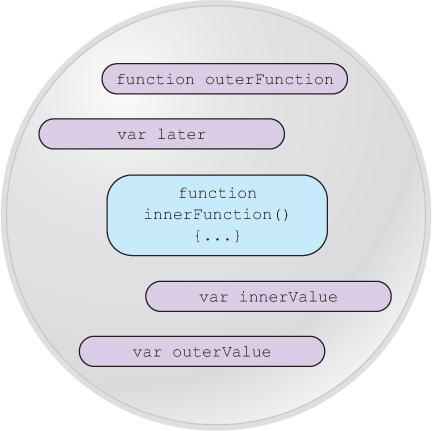
Listing 5.3. Using closures to approximate private variables
function Ninja() { #A var feints = 0; #B this.getFeints = function(){ #C return feints; #c }; #C this.feint = function(){ #D feints++; #D }; #D } var ninja1 = new Ninja(); #E ninja1.feint(); #F assert(ninja1.feints === undefined, #G "And the private data is inaccessible to us."); #G assert(ninja1.getFeints()=== 1, #H "We're able to access the internal feint count."); #H var ninja2 = new Ninja(); #I assert(ninja2.getFeints()=== 0, #I "The second ninja object gets its own feints variable."); #I #A - Defines the constructor for a Ninja #B - Declares a variable inside the constructor function. Because the scope of the variable is limited to inside the constructor, it’s a “private” variable. We’ll use it to count how many times the ninja has feinted. #C - Creates an accessor method for the feints counter. Because the variable isn’t accessible to code outside the constructor, this is a common way to give read-only access to the value. #D - Declares the increment method for the value. Because the value is private, no one can screw it up behind our backs; they’re limited to the access that we give them via methods. #E - Now for testing—first we construct an instance of Ninja. #F - Calls the feint method, which increments the count of the number of times that our ninja has feinted #G - Verifies that we can’t get at the variable directly #H - We were able to change the "private" variable, even though we had no direct access to it. #I - When we create a new ninja2 object with the Ninja constructor, the ninja2 object gets its own feints variable. !@%STYLE%@! {"css":"{\"css\": \"font-weight: bold;\"}","target":"[]"} !@%STYLE%@!