concept data object in category jboss
This is an excerpt from Manning's book Effective Business Process Management with JBoss BPM.
A data modeler provides developers the ability to define data objects that are part of the process. It provides a simple to use front-end, and allows the user to view the generated Java source code. This modeler is covered in later chapters.
Figure 4.7. The JBoss BPM Suite data model editor where you create, modify and view data objects.
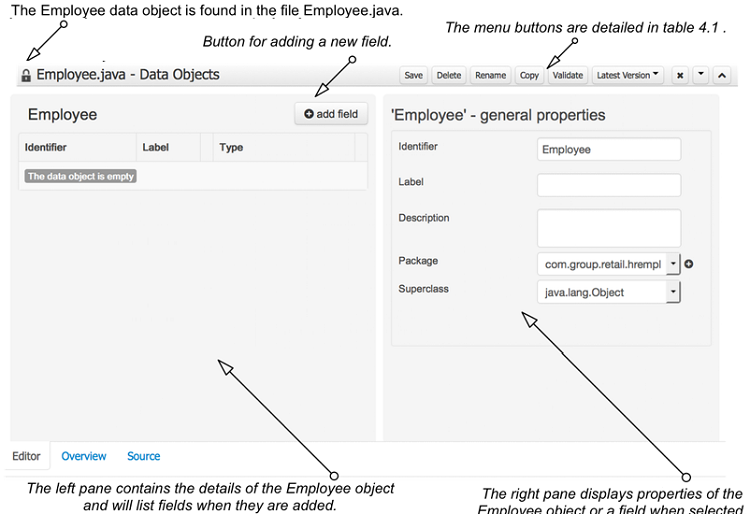
Table 4.1.An overview of the data modeler buttons as found on the top right of the screen. You can activate six actions by clicking on one of the buttons shown here.
Button name
Button action
Save
persists the contents of your data object to the file system
Delete
remove this data object from your project
Rename
change the name of the file holding this data object
Copy
create a copy of this data object, provides a quick way to setup a new data object
Validate
validates that the data object is in a good state to be used
Latest Version
a menu that lets you select any existing version saved in the past should you want to go back to a previous version of the data object