concept optimizer in category jQuery

This is an excerpt from Manning's book jQuery UI in Action.
There is an overwhelming number of options that you can provide the optimizer (a full list is available at http://requirejs.org/docs/optimization.html#options), but the vast majority of applications need only a few, which we’ll walk through. For your example, you need only the following build.js:
({
    name: "app",
    out: "app.built.js"
})
You set two options: name and out. name is the filename of the JavaScript module to optimize, and out controls the filename of the output file generated by the optimizer.
This tells the optimizer to build the module in file app.js and place the output in app.built.js. To expand this to handle multiple files, including CSS files, you have to use additional build options. The following code is the updated build.js:
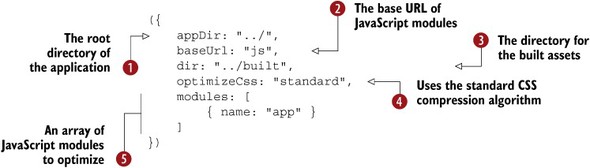
If you run this build from the command line again (r.js -o js/build.js), you’ll see that it takes a slightly different approach than your previous build. When you specify a dir option, the optimizer clones the app’s entire directory structure in a new directory. The name of the new directory is determined by the dir option—in this case, built
.
From there, the optimizer looks for any JavaScript or CSS files in the application—where the root of the application is determined by the appDir option
—minifies them, and inlines any @import statements in CSS files. The type of compression the optimizer does on CSS files is determined by the optimizeCss option. You use "standard" compression
, which removes all lines and unnecessary whitespace. If you want to preserve new lines or whitespace, you can set optimizeCSS to "keepLines" or "keepWhitespace", respectively.
The optimizer does the same task you saw in the previous section: optimizes AMD modules. By passing a modules option
, you can specify multiple files to optimize if your application requires it. The directory for the JavaScript modules is determined by the baseUrl
option.