concept option() in category jQuery

This is an excerpt from Manning's book jQuery UI in Action.
The option can be retrieved or changed using the option() method. You’ll learn how methods work, including the option() method, in the next section.
The option() method allows you to do two things after the widget has been initialized: retrieve the value of options (the getter) and set the value of options (the setter).
To get the values of all the options, call option() with no parameters. It returns an object with the options as key value pairs:
$( "#dialog" )
    .dialog()
    .dialog( "option" );
To invoke the setter version of option(), pass the name of the option as a second argument, and the value of the option as a third argument. The following sets the dialog’s height option to 500:
The setter form of option()returns a jQuery object, which has two powerful effects: it allows the setter to be applied to multiple elements, and it allows the setter to be chained with other jQuery method calls. The following code creates two dialogs, sets both their heights to 500 pixels, and then changes their text color to red:
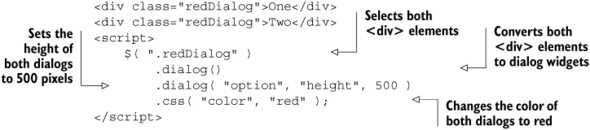
Because the setter form of option() returns the original jQuery object, the css() call changes the color of both <div> elements.
Changing options is a common task when dealing with jQuery UI widgets, so it’s important to understand the syntax of the option() method. Let’s look at an example of how changing options can be useful.