concept plugin in category jQuery

This is an excerpt from Manning's book jQuery in Action, Third Edition.
This book covers many aspects of the library starting from basic concepts, like selectors and the methods to traverse the Document Object Model (DOM), to more advanced ones, like extending the functionalities (creating plugins), improving the performances of your code, and testing. It assumes you have a minimal knowledge of JavaScript. If you need a refresher, take a look at the appendix. If you’re unfamiliar with the language, you may find this text too tough, so we encourage you to study it and then come back. We’ll wait here.
Accessing the URL, you’ll be prompted with a clean interface that shows a search bar that you can use to find the plugin(s) you need. Once the results of a search are returned, you can click a name to find a lot of other information on the plugin, including the link to download it.
Although npm is the recommended channel where you can find the plugins, it’s not the only one. An alternative with a nice UI but with a rather limited number of plugins is Unheap (http://www.unheap.com/).
Adding a plugin to your project means adding a dependency to it. Choosing a plugin is an important decision because your whole project will be built on top of it. You should take some time to check several factors before committing to the use of a given plugin. Some of these factors are strictly related to the code whereas others are external. The combination of these clues gives you an idea of the stability and the quality of the component. Let’s start analyzing some code-external factors.
Once you’ve found a plugin that fits your needs and you’ve checked that it deserves your attention, you can add it to your project. Using a well-written plugin is usually easy. All you have to do is to store it in a folder accessible by the web server and add it after the jQuery library.
As the first example, we’ll take a look at the jQuery Easing plugin (https://github.com/gdsmith/jquery.easing) that we introduced in section 8.3 when talking about easing functions. Once you’ve downloaded it, store it in a folder that your page can access. For example, you may store it in a folder called “javascript.” Then you have to add it to your page using a script element, after the jQuery library. If you add the plugin before jQuery, you’ll receive an error and all the JavaScript of your page will stop working. In your page you should have markup that resembles this:
<script src="javascript/jquery.1.11.3.min.js"></script>
<script src="javascript/jquery.easing.min.js"></script>
With the markup in place, what happens next depends on the plugin used. In this case, you don’t have any new jQuery methods or utility functions to call. jQuery Easing only injects easing functions into the jQuery core, allowing you to use them as if they were native.

This is an excerpt from Manning's book Extending jQuery.
The Validation plugin written by Jörn Zaefferer is widely used to validate user entry on the client side before submitting completed values to the server. Although the plugin isn’t part of the core jQuery functionality, it also provides extension points that allow you to create custom validation rules and have them applied as part of the existing processing. Chapter 14 illustrates how to create your own validation rules and integrate them with the built-in behavior.
In the previous part of the book, you saw how to create a collection plugin by using a framework to manage basic interactions with jQuery. Now you’ll see how jQuery UI provides a similar framework to ensure that the collection of plugins that make up this package work in a standard manner.
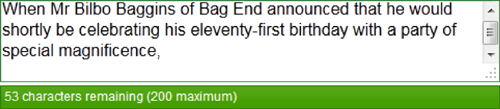
As well as limiting the text that can be entered, the plugin will provide feedback on how many characters have been used or remain available for input, as shown in figure 8.3. The feedback will use the current ThemeRoller theme to integrate its appearance with the rest of the page.
The plugin will include the same functionality as before:
The widget framework automatically handles attaching the plugin to a collection of elements, but you probably want to perform some processing when that occurs. To add your own code, you extend the basic widget as part of its definition, overriding the inherited implementation that does nothing.