concept POST in category jQuery
appears as: POST, POST

This is an excerpt from Manning's book jQuery in Action, Third Edition.
Table 10.1. XMLHttpRequest (XHR) methods and properties
Methods
Description
abort() Causes the currently executing request to be cancelled. getAllResponseHeaders() Returns a single string containing the names and values of all response headers, or null if no response has been received. getResponseHeader(name) Returns the string containing the text of the specified header, or null if either the response has not yet been received or the header doesn’t exist in the response. open(method, url[, async[, username[, password]]]) Sets the HTTP method (such as GET or POST) and the destination URL of the request. Optionally, the request can be declared synchronous and a username and password can be supplied for requests requiring container-based authentication. overrideMimeType(mime) Sets the Content-Type header for the response to mime. send([content]) Initiates the request. The optional content parameter provides the request body. content is ignored if request method is GET or HEAD. setRequestHeader(name, value) Sets a request header using the specified name and value. onreadystatechange The event handler to be invoked when the state of the request changes. readyState An integer value that indicates the current state of the request as follows: 0 = UNSENT 1 = OPENED 2 = HEADERS_RECEIVED 3 = LOADING 4 = DONE response The response entity body according to responseType. responseText The body content returned in the response. responseType Can be set to change the response type. Its value can be one of "" (empty string), arraybuffer, blob, document, json, or text. responseXML If the body content is identified as XML, the XML DOM is created from the body content. status The response status code returned from the server. For example: 200 for success or 404 for not found. See the HTTP specification[a] for the full set of codes. statusText The status text message returned by the response. timeout The number of milliseconds a request can take before being forced to terminate. The default value is 0, which means there is no timeout. ontimeout The event handler to be called when the request times out. upload The upload process can be tracked by adding an event listener to upload. withCredentials Indicates whether or not cross-site Access-Control requests should be made using credentials such as cookies or authorization headers. The default is false.
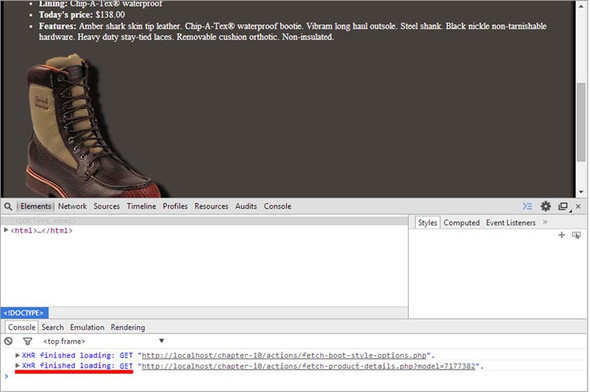
With that in mind, if you look back to our phase-one implementation of The Boot Closet (in listing 10.4), you’ll discover that you’re doing it wrong! Because jQuery initiates a POST request when you supply an object hash for the data parameter, you’re making a POST when you really should be making a GET request. If you glance at Chrome’s Developer Tools log (as shown in figure 10.4), when you display your page in Chrome, you can see that your second request, submitted when you make a selection from the style dropdown, is indeed a POST.