concept response in category jQuery

This is an excerpt from Manning's book jQuery in Action, Third Edition.
The first step sets up the display of the user interface; the others define its behavior. In web pages, the browser handles the setup of the display in response to the markup (HTML) and style (CSS) that you send to it. The script you include in the page defines the behavior of the interface, although it can change the user interface (UI) as well.
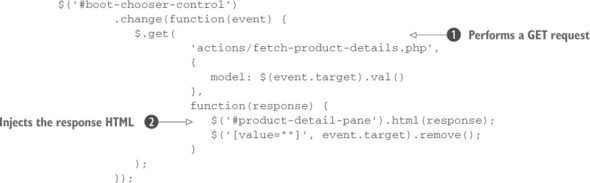
The $.get() utility function allows you to perform GET requests in a more versatile way. In addition to the request parameters and the callback to be invoked upon a successful response, you can now even direct how the response is to be interpreted and passed to the callback. If even that’s not enough versatility, you’ll be see a more general function, $.ajax(), where you’ll also examine the dataType parameter in greater detail. For now you’ll let it default to html or xml depending on the content type of the response. By using $.get() in your Boot Closet page, you can replace the use of the load() method, as shown in the next listing.
The changes for this second phase of our page are subtle but significant. You call $.get()
in place of load(), passing the same URL and the same request parameters. Because you’re using the $.get() utility function in this case, you can be assured that a GET request will be performed even if you pass an object. $.get() doesn’t automatically inject the response anywhere within the DOM, so you need to do that yourself by using jQuery’s html() method
.
Once the ready handler has determined that the readyState is complete and that the request completed successfully, you can retrieve the body of the response from the XHR instance.
Despite the moniker Ajax (where the X stands for XML), the format of the response body can be any text format; it’s not limited to XML. The response to Ajax requests could be plain text, an HTML fragment, or any data represented using the JavaScript Object Notation (JSON) format.
Regardless of its format, the body of the response is available via the responseText property of the XHR instance (assuming that the request completes successfully). If the response indicates that the format of its body is XML by including a content type header specifying a MIME type of text/xml or application/xml or a MIME type that ends with +xml, the response body will be parsed as XML. The resulting DOM will be available in the responseXML property. JavaScript (and jQuery itself, using its selector API) can then be used to process the XML DOM.