concept text in category jQuery

This is an excerpt from Manning's book Extending jQuery.
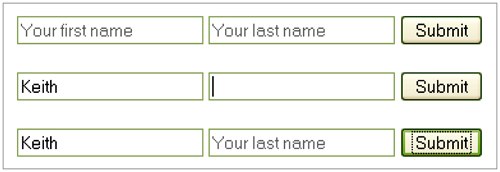
When the field gains focus, you need to remove the placeholder text if it’s present, and change the styling of the field to clear the grayed look. Similarly, when the field loses focus, you should restore the placeholder text and styling if the field value is still blank. Figure 2.3 shows the Watermark plugin in operation at various times when entering data.
Figure 2.3. Watermark plugin in operation: before interaction, after entering first name, and ready to submit
For maximum flexibility, the styling of the fields when showing the placeholder text should be controlled via CSS. You can assign a class to the field when displaying the text and remove that class when it gains focus or a real value is entered. The actual appearance is then left to a CSS style and can be easily overridden by the user.
The whole process is driven by the data type specified for your request, the standard ones being text, html, xml, script, json, and jsonp. jQuery will try to determine the data type for retrieved content, if it wasn’t given, by inspecting the returned MIME type. The conversion process is invoked if the returned data type doesn’t match the requested one.
You start by defining a new standalone function to process the conversion
. It accepts one parameter, which is the full CSV text (csvText). After declaring some working variables, you separate the CSV text into individual lines
, and then process each one in turn
. The splitting of the text is done by a regular expression supplied to the match function. You look for sequences of characters that aren’t line feeds or carriage returns ([^\r\n]+), and continue that throughout the string (g flag). The result of this call is an array of the matching sections (lines) from the text.