concept widget in category jQuery

This is an excerpt from Manning's book jQuery UI in Action.
If you can’t find a widget to meet your needs, it’s easy to build your own with jQuery UI. We’ll discuss how to build custom widgets using the widget factory in chapter 8.
Finally, all jQuery UI widgets are built with extensibility in mind. You can make subtle alterations to the library’s widgets or build completely new widgets on top of them easily. We’ll discuss extending jQuery UI widgets in chapter 9.
Why build a widget rather than a jQuery plugin?
A widget’s differentiating feature is its concept of state. Many jQuery plugins don’t have—or need—the concept of state. Consider the following jQuery plugin that replaces the selected element’s contents with a random number:
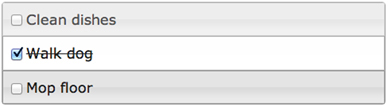
To walk through these steps, you need a widget to build, and in this chapter, you’ll build a to-do list. In this case it will be a list of tasks that the user can check and uncheck. Such a list could be used for any set of tasks—for example, a grocery list or your widget-creation checklist. An image of the to-do list you’ll build is shown in figure 8.1.
Let’s dig right in with the API to create widgets: $.widget().
This is easier to see with an example. The first method you override in any custom widget is the _create() method. The widget factory invokes _create() anytime an element is converted to a widget. The default _create() on $.Widget.prototype does nothing. To make your widget do something useful, you must provide your own _create():
$.widget( "tj.todo", {
    _create: function() {
        this.element.addClass( "tj-todo" );
    }
});
You provide a _create() method for the todo widget’s prototype, and the widget factory uses it instead of $.Widget.prototype._create(). Although the _create() method doesn’t have any parameters, it does have this.element set to the element the widget was initialized on, and this.options set to any options that were passed. You use the this.element reference to add a CSS class name to the element that was converted to a widget.
Does the widget use the widget factory? If so, all the conventions we’ve discussed throughout the book for options, methods, events, and such still apply. Usually, widget maintainers mention whether the widget factory is used in the widget’s documentation; if not, you can look for a call to $.widget() in the widget’s code. Is the widget themeable? If it is, the existing jQuery UI themes will work fine with the new widget. To see if the widget is themeable, check for the CSS framework’s class names (ui-widget, ui-widget-content, and so on) on the widget’s markup. Does the widget have tests? Unit tests are a sign that the widget’s code is stable and all its APIs work. Furthermore, because unit tests aid with code maintenance, their presence is a good sign that the widget will be updated as future versions of jQuery are released. Is it well documented? This one is a bit self-explanatory; thorough documentation makes it easier to get started with a widget and to use it. Is it maintained? A widget that was last updated a month ago is more likely to be actively maintained than a widget that was last updated two years ago. Look for the release date of the latest version of the widget, and when the last few commits were. Is it battle tested? If you’re the 10,000th person to use a widget, chances are you’ll have a smoother experience than the 10th person to use it. Widgets that have been used in numerous production applications are more likely to have the kinks worked out. If the widget is on GitHub, look for projects that have a lot of watchers and stars. If the project isn’t on GitHub, look for how much information is available with a Google search or on Stack Overflow.

This is an excerpt from Manning's book Extending jQuery.
jQuery UI “is a curated set of user interface interactions, effects, widgets, and themes built on top of the jQuery JavaScript Library” (http://jqueryui.com/). It defines a widget framework that allows you to create plugins that work in a consistent manner and that can take advantage of the numerous themes available for styling the UI. Chapter 8 looks at the widget framework and how you can use it to build your own component.
jQuery UI “is a curated set of user interface interactions, effects, widgets, and themes built on top of the jQuery JavaScript Library” (http://jqueryui.com). It’s an official jQuery add-on that includes several UI components known as widgets. It uses the ThemeRoller tool (http://jqueryui.com/themeroller/) to generate a consistent look and feel for all the widgets that it manages.
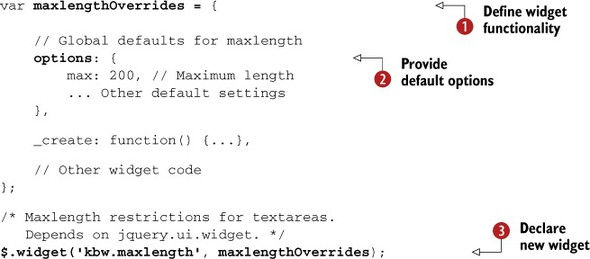
The widget framework manages the creation of widgets, allowing it to add standard functionality to all of them. Common abilities include initializing the plugin for a collection of elements, handling option setting and retrieval, and removing plugin functionality when it’s no longer needed. You create your widget as follows.