concept Maven in category junit

This is an excerpt from Manning's book JUnit in Action.
To manage JUnit 5’s dependencies efficiently, it’s logical to work with the help of a build tool. In this book, we’ve chosen to use Maven, a very popular build tool. Chapter 10 is dedicated to the topic of running JUnit tests from Maven. What you need to know now are the basic ideas behind Maven: configuring your project through the pom.xml file, executing the mvn clean install command, and understanding the command’s effects.
10.2 Using the Maven plugins
We have seen what Maven is and how to use it to start a project from scratch. We have also seen how to generate the project documentation and how to import our project in Eclipse and in IntelliJ.
Like any other build system, Maven is supposed to build our projects (compile our software and package in an archive). Every task in Maven is performed by an appropriate plugin, the configuration of which is in the <plugins> section of the project descriptor. To compile the source code, all we need to do is invoke the compile phase on the command line
mvn compilewhich causes Maven to execute all the plugins attached to the compile phase (in particular it will invoke the maven-compiler-plugin). But before invoking the compile phase, as already discussed, Maven goes through the validate phase, downloads all the dependencies listed in the pom.xml file, and includes them in the classpath of the project. When the compilation process is complete, we can go to the target/classes/ folder and see the compiled classes there.
on the command line where our pom.xml file is. Maven should start downloading its plugins, and after their successful installation, it produces the nice website shown in figure 10.4.
Figure 10.4 Maven produces nice website documentation for the project.
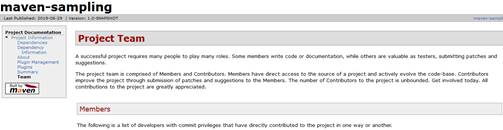
This website is generated in the Maven build directory—another convention. Maven uses the target/ folder for all the needs of the build itself. The source code is compiled in the target/classes/ folder, and the documentation is generated in target/site/.
After we examine the project, we probably notice that this website is more like a skeleton of a website. That is absolutely true. Remember that we entered a small amount of data in the first place. We could enter more data and web pages in the src/site, and Maven would include it on the website, thus generating full-blown documentation.
This is an excerpt from Manning's book JUnit in Action, Second Edition.
In part 3 of the book, we look at running tests using the Ant build tool and also the Maven build tool.
Once you’ve used Ant on several projects, you’ll notice that projects almost always need the same Ant scripts (or at least a good percentage of them). These scripts are easy enough to reuse through cutting and pasting, but each new project requires a bit of fussing to get the Ant buildfiles working just right. In addition, each project usually ends up having several subprojects, each of which requires you to create and maintain an Ant buildfile. Maven (http://maven.apache.org/) picks up where Ant leaves off, making it a natural fit for many teams. Like Ant, Maven is a tool for running other tools, but Maven is designed to take tool reuse to the next level. If Ant is a source-building framework, then Maven is a source-building environment.
In order to understand better how Maven works, you need to understand the key points (principles) behind Maven. Maven was designed to take the build systems to the next level, beyond Ant. You need to become familiar with the things that the Maven community didn’t like in Ant and how it tried to avoid them in designing Maven, that is, the core reason for starting Maven as a whole new project.
From the beginning of the Maven project, certain ground rules were in place for the entire software architecture of the project. These rules aim to simplify development with Maven and to make it easier for developers to implement the build system. One of the fundamental ideas of Maven is that the build system should be as simple as possible—software engineers should not spend a lot of time implementing the build system. It should be easy enough to start a new project from scratch and then rapidly begin developing the software, not spend valuable time designing and implementing a build system.
If you remember, with Ant we had targets with almost the same names. And yes, the targets in Ant are the analogue of the phases in Maven, with one exception. In Ant you write the targets and you specify which target depends on which other target. With Maven, we see again the convention-over-configuration principle here. These phases are already defined for us in the order in which we listed them. And Maven invokes these phases in a strict order: they get executed sequentially in the order listed to complete the lifecycle. This means that if you invoke any of them, for example, if you type
mvn compileon the command line in your project’s home directory, Maven will first validate the project and then try to compile the sources of your project.
To continue, let’s generate some documentation for the project. But wait a second, how are we supposed to do that? We don’t have any files to generate the documentation from. This is another one of Maven’s great features—with the little configuration and description that we have, we can produce a fully functional website skeleton. Type
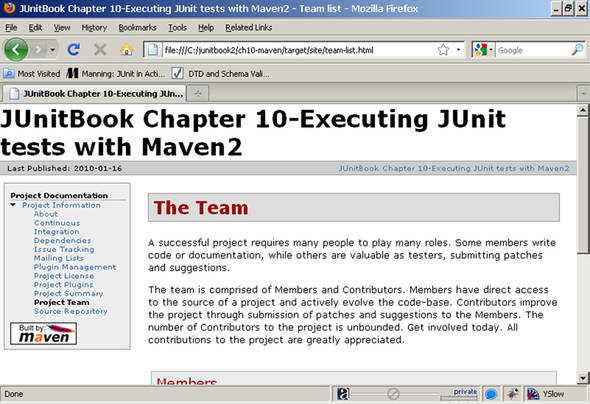
mvn siteon the command line where your pom.xml is. Maven should start downloading its plug-ins, and after their successful installation, it will produce the nice website you see in figure 10.2.
This website is generated in Maven’s build directory—another convention. Maven uses the target/ directory for all the needs of the build itself. The convention continues even beneath this directory: source code is compiled in the target/classes/ directory, and the documentation is generated in target/site/.
After you examine the project, you’ll probably notice that this website is more like a skeleton of a website. That’s true, but remember that we entered only a small amount of data to begin with. We could enter more data and web pages in the src/site directory, and Maven will include it in the website, generating full documentation.
So far, we’ve discussed Maven as the tool that’s going to take the place of Ant. But as with all other things in life, it’s not all a bed of roses. Maven has its bad sides, too. Before you get too excited, just think about it. Maven has been out since 2002, and still Ant is the de facto standard for building software.
All of the people who’ve used Maven agree that it’s easy to start up with it. And the idea behind the project is amazing. But things seem to break when you need to do some of the unconventional things.
What’s great about Maven is that it will set up a frame for you and will constrain you to think inside that frame—to think the Maven way and do things the Maven way. When you work with Maven for a certain period of time, you’ll inevitably need to copy a file from one place to another. We think you’ll be surprised to see that there’s no copy plug-in in Maven, in contrast with Ant, which has the copy task. You have to deal with the situation, and if you investigate further and think “the Maven way,” it may turn out that you never needed to copy that file.
In most cases Maven won’t let you do any nonsense. It will restrict you and show you the way things need to be done. Ant works the other way: it’s a powerful tool, and you can do whatever you need to do. But it can be dangerous in inappropriate hands. And again, it’s up to you to decide which of these tools you want to use. Some companies hire build engineers, who are considered to have the appropriate knowledge, so for them Ant is no danger at all—it’s just a powerful tool.