concept project in category junit

This is an excerpt from Manning's book JUnit in Action.
If you are familiar with JUnit 4, you may wonder what’s new in this version, as well as why and how to move toward it. JUnit 5 represents the next generation of JUnit. You’ll use the programming capabilities introduced starting with Java 8; you’ll be able to build tests modularly and hierarchically; and the tests will be easier to understand, maintain, and extend. Chapter 4 discusses the transition from JUnit 4 to JUnit 5 and shows that the projects you are working on may benefit from the great features of JUnit 5. As you’ll see, you can make this transition smoothly, in small steps.
17.2 Creating a project with Spring Initializr
In the Spring Boot spirit of supporting developers through the convention-over-configuration approach and supporting the rapid creation of applications, we will use Spring Initializr to generate a project with only what we need to start quickly. To do this, we go to https://start.spring.io/ and insert the configuration data of our new project on the web page. Spring Boot generates a skeleton for the application, and we transfer into it the business logic for tracking passenger registration through the registration manager of the example flight-management system we implemented in chapter 16.
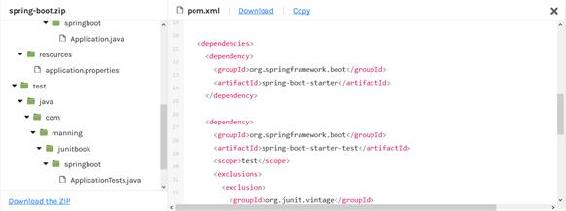
When we click the Explore – Ctrl + Space button, we see a few details about what will be generated: the structure of the project and the content of the Maven pom.xml file. We can click Download the ZIP or, on the previous screen, Generate - Ctrl +, and we’ll get the archive containing the project.
Figure 17.3 The structure of the project (expanded folders), and the content of the Maven pom.xml file (including the spring-boot-starter dependency)

This is an excerpt from Manning's book JUnit in Action, Second Edition.
In chapter 1, section 1.4, we discussed running JUnit from the command line. Running a single JUnit test case against a single class isn’t difficult. But it isn’t practical to run continuous tests in a project with hundreds or even thousands of classes.
When you build a project, you often want to produce more than binary code. For a distribution, you may also want to generate Javadocs. For an internal development build, you might skip Javadoc generation. At times, you may want to run a build from scratch. You may also want to compile only the classes that have changed. To help you manage the build process, a build file may have several targets, encapsulating the different tasks needed to create your application and related resources.