concept partition in category kafka

This is an excerpt from Manning's book Kafka in Action.
Figure 2.7. Segment files make up partitions. Partitions make up Topics.
Topics are where most users will start to think about the logic of what messages should go where. Topics are actually made out of units called partitions. In other words, one or many partitions can make up a single topic. As far as what is actually implemented on the computer’s disk, partitions are what Kafka will be working with for the most part. A single partition only exists on one broker and will not be split between brokers. Figure 2.7 shows how each partition will exist on a single message broker and will not be divided smaller than that unit. Think back to our first example of the helloworld topic. If you are looking at reliability and want 3 copies of the data, the topic itself is not one entity (or single file) that is copied; rather it is the various partitions that are replicated 3 times each. As a side note, the partition is even further broken up into segment files (the actual) files written on the disk drive. We will cover the details of these files and their location when we talk about brokers in later chapters.
One of the most important concepts to understand at this point is the idea that one of the partition copies (replicas) will be what is referred to as a 'leader'. For example, if you have a topic made up of 3 partitions and a replication factor of 3, each and every partitions will have a leader elected. That leader will be one of the copies of the partition and the others 2 (in this case) will be followers that update their information from their partition leader. Producers and consumers will only read or write (in happy path scenarios) from the leader of each partition it is assigned. But how does your producer or consumer know which partition is the leader? In the event of distributed computing and random failures, that answer is often influenced with help from ZooKeeper.
Figure 7.1. Example Topic With Partitions
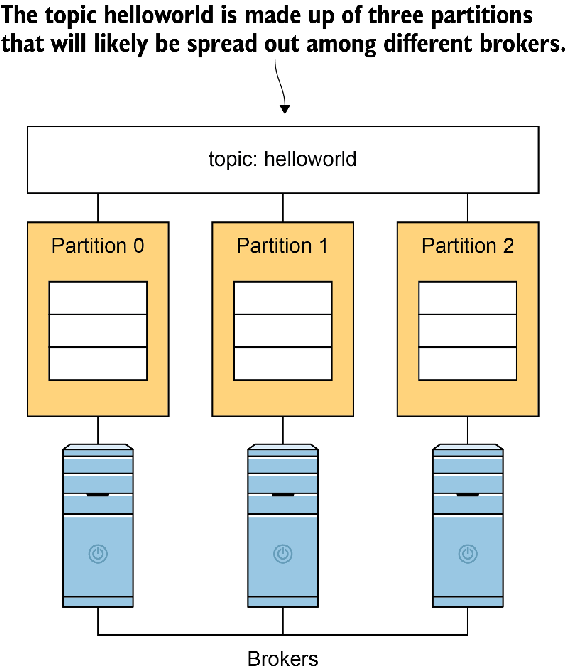
One common question I often still get is along the following lines: "My cluster is X many nodes, what is the number of partitions I should use?" The biggest takeaway is that partitions are a per-topic design question, not a cluster-wide limitation or mandate. While there can be a default number used in topic creation, concern should be taken to really think about the needs of your data. You should have a reason why you pick a number of partitions. Let’s say that you want to have a partition for server as a rule. However, note that just because you have a partition on a server, does not mean producers will write evenly between them. In order to do so, you would have to make sure that you have each partition leader spread out in that manner as well and stays that way. You need to get familiar with your data! Lets take a look at a checklist of items to think about in general and in this scenario:

This is an excerpt from Manning's book Kafka Streams in Action: Real-time apps and microservices with the Kafka Streams API.
The use of key/value pairs and partitions to group distributed data together
HashCode.(key) % number of partitions
Partitions are a critical part of Kafka’s design. They’re essential for performance, and they guarantee that data with the same keys will be sent to the same consumer and in order. Figure 2.7 shows how partitions work.
Figure 2.7. Kafka uses partitions to achieve high throughput and spread the messages for an individual topic across several machines in the cluster.
![]()
Partitioning a topic essentially splits the data forwarded to a topic across parallel streams, and it’s key to how Kafka achieves its tremendous throughput. I explained that a topic is a distributed log; each partition is similarly a log unto itself and follows the same rules. Kafka appends each incoming message to the end of the log, and all messages are strictly time-ordered. Each message has an offset number assigned to it. The order of messages across partitions isn’t guaranteed, but the order of messages within each partition is guaranteed.