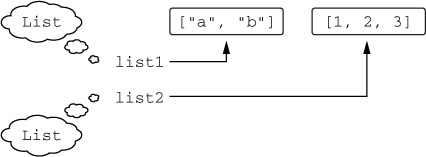
concept List in category kotlin
This is an excerpt from Manning's book Functional Programming with Kotlin.
The example takes two parameters: a
CreditCard, and theIntnumber of coffees to be purchased. After theCoffees have been successfully purchased, they are placed into aListdata type. The list is initialized using theList(n) { buyCoffee(cc) }syntax, wherendescribes the number of coffees, and{ buyCoffee(cc) }a function that is used to initialize each element of the list.An
unzipis then used to destructure the list of pairs into two separate lists, each representing one side of thePair. Destructuring is the process of extracting values from a complex data type. We are now left with thecoffeeslist being aList<Coffee>, andchargesbeing aList<Charge>. The final step involves reconstructing the data into the required output. This is done by constructing aPairofList<Coffee>mapped to the combinedCharges for all theCoffees in the list.reduceis an example of a higher-order function, which will be properly introduced in chapter 2.
Let’s look first at the definition of the data type, which begins with the keywords
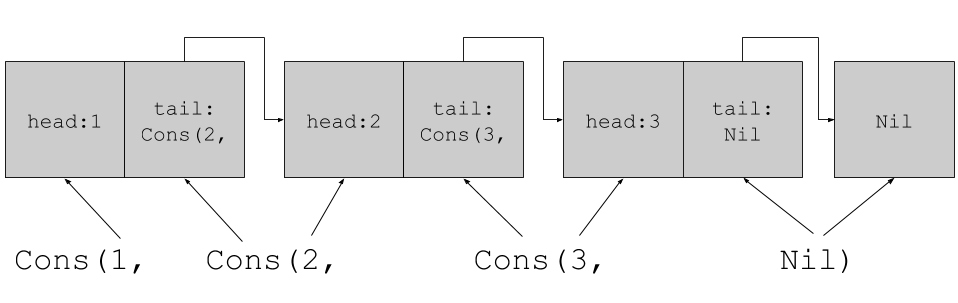
sealed class. Usually, we introduce a data type with theclasskeyword. Here we’re declaring aclass, calledList, with no instance methods on it. Addingsealedin front of the class declaration means that all implementations must be declared in this file. A sealed class is also abstract by default, so can not be instantiated by itself. There are two implementations, or data constructors, ofListdeclared next, to represent the two possible forms aListcan take. As the figure shows, aListcan be empty, denoted by the data constructorNil, or it can be nonempty, denoted by the data constructorCons(traditionally short for construct). A nonempty list consists of an initial element,head, followed by aList(possibly empty) of remaining elements (thetail).Figure 3.1. The singly linked list, each tail links to the next list element.
Just as functions can be polymorphic, data types can be as well, and by adding the type parameter
<out A>aftersealed class Listand then using thatAparameter inside of theConsdata constructor, we declare theListdata type to be polymorphic in the type of elements it contains, which means we can use this same definition for a list ofIntelements (denotedList<Int>),Doubleelements (denotedList<Double>),Stringelements(List<String>), and so on (theoutindicates that the type parameterAis covariant—see sidebar “More about variance” for more information).
Up to this point we have focused our attention on the definition of the most basic functional data structure, the singly linked list. Having this definition isn’t of much use unless we actually start doing something with it. In this section, you will learn to apply the technique of matching, in order to interpret and process the
Listthat was defined in section 2.1.Listing 3.2. Companion object inside sealed definition of
Listdata typesealed class List<out A> { #1 companion object { #2 fun <A> of(vararg aa: A): List<A> { #3 val tail = aa.sliceArray(1 until aa.size) return if (aa.isEmpty()) Nil else Cons(aa[0], of(*tail)) } fun sum(ints: List<Int>): Int = when (ints) { is Nil -> 0 is Cons -> ints.head + sum(ints.tail) } fun product(doubles: List<Double>): Double = when (doubles) { is Nil -> 1.0 is Cons -> if (doubles.head == 0.0) 0.0 else doubles.head * product(doubles.tail) } } }In order to add some behaviour to the
Listtype, a companion object is added to the body of its definition. Any functions defined within thecompanion objectblock can be called like you would a static method in Java. For instance, theofmethod can be used in the following way to construct a newListfrom the parameters passed in:
Firstly, let’s revisit the
sumfunction that we wrote in the companion object of ourListclass:Listing 3.7. Simple
whenmatching inListcompanion objectThe most noticeable problem is that we are accessing the value
xsinside the evaluation of our branch logic by members asxs.headandxs.tail. Notice thatxsis declared as aList, which has noheadortail. The fact thatListhas been smartcast toConsis never explicitly stated, which causes confusion about the ambiguous type ofxs.If Kotlin supported pattern matching as provided by other languages, it would allow us to express this as in the following Kotlin pseudocode: .Pattern matching in
Listcompanion object using pseudocode
This is an excerpt from Manning's book The Joy of Kotlin.
Folding a list involves starting with a value and composing it successively with each element of the list. This obviously takes an amount of time proportional to the length of the list. Is there any way to make this operation faster? Or, at least, is there a way to make it appear faster? As an example of a fold application, you created a
lengthfunction inListin chapter 5 (exercise 5.10) with the following implementation:
fun <A, B> unzip(list: List<Pair<A, B>>): Pair<List<A>, List<B>> =
    list.coFoldRight(Pair(List(), List())) { pair ->
        { listPair: Pair<List<A>, List<B>> ->
            Pair(listPair.first.cons(pair.first),
                 listPair.second.cons(pair.second))
        }
    }

This is an excerpt from Manning's book Kotlin in Action.
The last function is no more complex than lastChar for String, discussed in the previous section: it’s an extension on the List class. For max, we show a simplified declaration (the real library function works not only for Int numbers, but for any comparable elements):
Generics allow you to define types that have type parameters. When an instance of such a type is created, type parameters are substituted with specific types called type arguments. For example, if you have a variable of type List, it’s useful to know what kind of things are stored in that list. The type parameter lets you specify exactly that—instead of “This variable holds a list,” you can say something like “This variable holds a list of strings.” Kotlin’s syntax for saying “a list of strings” looks the same as in Java: List<String>. You can also declare multiple type parameters for a class. For example, the Map class has type parameters for the key type and the value type: class Map<K, V>. We can instantiate it with specific arguments: Map<String, Person>. So far, everything looks exactly as it does in Java.
Just as in Java, you declare a Kotlin generic class or interface by putting angle brackets after the class name and the type parameters in the angle brackets. Once you do that, you can use the type parameters in the body of the class, just like any other types. Let’s look at how the standard Java interface List can be declared in Kotlin. To simplify it, we’ve omitted the majority of the methods:
interface List<T> { #1 operator fun get(index: Int): T #2 // ... } #1 - The List interface defines a type parameter T. #2 - T can be used as a regular type in an interface or a class.Later in this chapter, when we get to the topic of variance, you’ll improve on this example and see how List is declared in the Kotlin standard library.
Just as in Java, Kotlin’s generics are erased at runtime. This means an instance of a generic class doesn’t carry information about the type arguments used to create that instance. For example, if you create a List<String> and put a bunch of strings into it, at runtime you’ll only be able to see that it’s a List. It’s not possible to identify which type of elements the list was intended to contain. (Of course, you can get an element and check its type, but that won’t give you any guarantees, because other elements may have different types.)