concept controller in category kubernetes

This is an excerpt from Manning's book Learn Kubernetes in a Month of Lunches.
That's where controllers come in. A controller is a Kubernetes resource which manages other resources - it works with the Kubernetes API to watch the current state of the system, compares that to the desired state of its resources, and makes any changes it needs. There are many controllers, but the main one for managing pods is the deployment, which solves the problems I've just described. If a node goes offline and you lose the pod, the deployment will create a replacement pod on another node; if you want to scale your deployment you can specify how many pods you want and the deployment controller will run them across many nodes. Figure 2.6 shows the relationship between deployments, pods and containers.
Using labels to identify the relationship between resources is such a core pattern in Kubernetes that it's worth a diagram to make sure it’s clear. Resources can have labels applied at creation, and then added, removed or edited during their lifetime. Controllers use a label selector to identify the resources they manage - and that can be a simple query matching resources with a particular label, as you see in figure 2.9.
Figure 2.9 Controllers identify the resources they manage using labels and selectors

This is very flexible because it means controllers don't need to maintain a list of all the resources they manage, the label selector is part of the controller specification and controllers can find matching resources at any time by querying the Kubernetes API. It's also something you need to be careful with, because you can edit the labels for a resource and end up breaking the relationship between it and its controller.

This is an excerpt from Manning's book Kubernetes in Action, Second Edition.
Kubectl splits the file into individual objects and creates each of them by sending an HTTP PUT or POST request to the API, as is usually the case with RESTful APIs. The API Server validates the objects and stores them in the etcd datastore. In addition, it notifies all interested components that these objects have been created. Controllers, which are explained next, are one of these components.
The Kubernetes Control Plane runs several components called controllers that manage the objects you create. Each controller is usually only responsible for one object type. For example, the Deployment controller manages Deployment objects.
As shown in figure 4.4, the task of a controller is to read the desired object state from the object’s Spec section, perform the actions required to achieve this state, and report back the actual state of the object by writing to its Status section.
Figure 4.4 How a controller manages an object
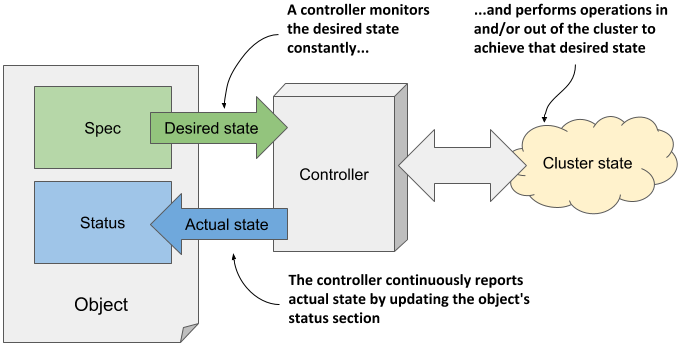
You’ll learn more about the individual controllers and their responsibilities in chapter 13. For now, just remember that a controller is associated with most object types and that the controller is the thing that reads the Spec and writes the Status of the object.
This is an excerpt from Manning's book Kubernetes in Action.
Changes to the label selector and the pod template have no effect on existing pods. Changing the label selector makes the existing pods fall out of the scope of the Replication-Controller, so the controller stops caring about them. ReplicationControllers also don’t care about the actual “contents” of its pods (the container images, environment variables, and other things) after they create the pod. The template therefore only affects new pods created by this ReplicationController. You can think of it as a cookie cutter for cutting out new pods.
Listing 11.9. Watching events emitted by the controllers
$ kubectl get events --watch
    NAME             KIND         REASON              SOURCE
... kubia            Deployment   ScalingReplicaSet   deployment-controller
                     ➥  Scaled up replica set kubia-193 to 3
... kubia-193        ReplicaSet   SuccessfulCreate    replicaset-controller
                     ➥  Created pod: kubia-193-w7ll2
... kubia-193-tpg6j  Pod          Scheduled           default-scheduler
                     ➥  Successfully assigned kubia-193-tpg6j to node1
... kubia-193        ReplicaSet   SuccessfulCreate    replicaset-controller
                     ➥  Created pod: kubia-193-39590
... kubia-193        ReplicaSet   SuccessfulCreate    replicaset-controller
                     ➥  Created pod: kubia-193-tpg6j
... kubia-193-39590  Pod          Scheduled           default-scheduler
                     ➥  Successfully assigned kubia-193-39590 to node2
... kubia-193-w7ll2  Pod          Scheduled           default-scheduler
                     ➥  Successfully assigned kubia-193-w7ll2 to node2
... kubia-193-tpg6j  Pod          Pulled              kubelet, node1
                     ➥  Container image already present on machine
... kubia-193-tpg6j  Pod          Created             kubelet, node1
                     ➥  Created container with id 13da752
... kubia-193-39590  Pod          Pulled              kubelet, node2
                     ➥  Container image already present on machine
... kubia-193-tpg6j  Pod          Started             kubelet, node1
                     ➥  Started container with id 13da752
... kubia-193-w7ll2  Pod          Pulled              kubelet, node2
                     ➥  Container image already present on machine
... kubia-193-39590  Pod          Created             kubelet, node2
                     ➥  Created container with id 8850184
...


!@%STYLE%@!
{"css":"{\"css\": \"font-weight: bold;\"}","target":"[[{\"line\":0,\"ch\":0},{\"line\":0,\"ch\":28}]]"}
!@%STYLE%@!
What each of these controllers does should be evident from its name. From the list, you can tell there’s a controller for almost every resource you can create. Resources are descriptions of what should be running in the cluster, whereas the controllers are the active Kubernetes components that perform actual work as a result of the deployed resources.