concept datum in category kubernetes

This is an excerpt from Manning's book Learn Kubernetes in a Month of Lunches.
Kubernetes manages more than just containers, which is what makes it a complete application platform. The cluster has a distributed database and you can use that to store configuration files for your applications, and to store secrets like API keys and connection credentials. Kubernetes delivers those seamlessly to your containers, which lets you use the same container images in every environment, and apply the correct configuration from the cluster. Kubernetes also provides storage so your applications can maintain data outside of containers, giving you high availability for stateful apps. And Kubernetes manages network traffic coming into the cluster, sending it to the right containers for processing. Figure 1.3 shows those other resources, which are the main features of Kubernetes.
Data access in a clustered environment is difficult. Moving compute around is the easy part - the Kubernetes API is in constant contact with the nodes, and if a node stops responding then Kubernetes can assume it's offline and start replacements for all of its pods on other nodes. But if an application in one of those pods was storing data on the node, then the replacement won't have access to that data when it starts on a different node - and it would be disappointing if that data contained a very large order which a customer hadn't completed. You really need cluster-wide storage, so pods can access the same data from any node.
Kubernetes doesn't have built-in cluster-wide storage, because there isn’t a single solution which works for every scenario. Apps have different storage requirements, and the platforms which can run Kubernetes have different storage capabilities. Data is always a balance between speed of access and durability, and Kubernetes supports that by allowing you to define the different classes of storage which your cluster provides, and to request a specific storage class for your application. In this chapter you'll learn how to work with different types of storage and how Kubernetes abstracts away storage implementation details.
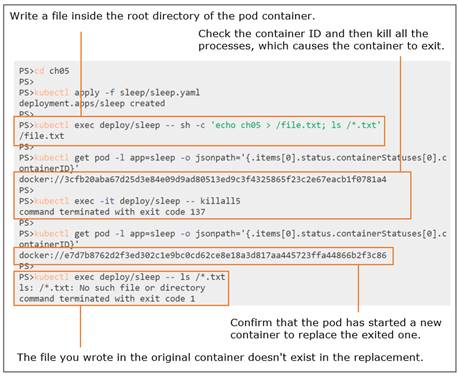
There's two important things to remember from this exercise: the filesystem of a pod container has the lifecycle of the container rather than the pod, and when Kubernetes talks about a pod restart, it's actually a replacement container. So if your apps are merrily writing data inside containers, it doesn't get stored at the pod level, and if the pod restarts with a new container then all the data is gone. My output in figure 5.2 shows that.
Figure 5.2 The writeable layer has the lifecycle of the container, not the pod
We already know that Kubernetes can build the container filesystem from other sources - we surfaced ConfigMaps and Secrets into filesystem directories in chapter 4. The mechanism for that is to define a volume at the pod level which makes another storage source available, and then to mount it into the container filesystem at a specified path. ConfigMaps and Secrets are read-only storage units, but Kubernetes supports many other types of volume which are writeable. Figure 5.3 shows how you can design a pod which uses a volume to store data which persists between restarts and could even be accessible cluster-wide.
Listing 5.1 - sleep-with-emptyDir.yaml, a simple volume spec
spec:
  containers:
    - name: sleep
      image: kiamol/ch03-sleep
      volumeMounts:
       - name: data                 # mounts a volume called data
          mountPath: /data          # into the /data directory
  volumes:
    - name: data                    # this is the data volume spec
      emptyDir: {}                  # which is the EmptyDir type
An empty directory sounds like the least useful piece of storage you can imagine, but actually it has a lot of uses because it has the lifecycle of the pod. Any data stored in an EmptyDir volume remains in the pod between restarts, so replacement containers can access data written by their predecessors.
This is an excerpt from Manning's book Kubernetes in Action.
Without going into too many details, as you can see, the kubernetes.io/created-by annotation holds JSON data about the object that created the pod. That’s not something you’d want to put into a label. Labels should be short, whereas annotations can contain relatively large blobs of data (up to 256 KB in total).
These volume types serve various purposes. You’ll learn about some of them in the following sections. Special types of volumes (secret, downwardAPI, configMap) are covered in the next two chapters, because they aren’t used for storing data, but for exposing Kubernetes metadata to apps running in the pod.
Listing 6.6. Retrieving MongoDB’s persisted data in a new pod
$ kubectl exec -it mongodb mongo
MongoDB shell version: 3.2.8
connecting to: mongodb://127.0.0.1:27017
Welcome to the MongoDB shell.
...
> use mystore
switched to db mystore
> db.foo.find()
{ "_id" : ObjectId("57a61eb9de0cfd512374cc75"), "name" : "foo" }


!@%STYLE%@!
{"css":"{\"css\": \"font-weight: bold;\"}","target":"[[{\"line\":0,\"ch\":0},{\"line\":0,\"ch\":32}],[{\"line\":5,\"ch\":0},{\"line\":5,\"ch\":13}],[{\"line\":7,\"ch\":0},{\"line\":7,\"ch\":15}]]"}
!@%STYLE%@!
As expected, the data is still there, even though you deleted the pod and re-created it. This confirms you can use a GCE persistent disk to persist data across multiple pod instances.
