concept environment in category kubernetes

This is an excerpt from Manning's book Kubernetes in Action, Second Edition.
As mentioned previously, Kubernetes offers infrastructure-related services that would otherwise have to be implemented in your applications. This includes the discovery of services and/or peers in a distributed application, leader election, centralized application configuration and others. Kubernetes provides this while keeping the application Kubernetes-agnostic, but when required, applications can also query the Kubernetes API to obtain detailed information about their environment. They can also use the API to change the environment.
Instead of using virtual machines to isolate the environments of individual microservices (or software processes in general), most development and operations teams now prefer to use containers. They allow you to run multiple services on the same host computer, while keeping them isolated from each other. Like VMs, but with much less overhead.

This is an excerpt from Manning's book GitOps and Kuberentes.
GitOps aids in the recovery of infrastructure environments by storing these declarative specifications of the environment under source control as a source of truth. By having a complete definition of what the environment should be, it facilitates the re-creation of the environment in the event of a disaster. Disaster recovery becomes a simple exercise of (re)applying all the configuration stored in the Git repository. In fact, using this method, one might observe that there is not much of a difference between the procedures that happen during a disaster, versus normal day-to-day upgrades and deployments. With GitOps, you are, in effect, practicing disaster recovery procedures on a regular basis, making you well prepared on the occasion that a real disaster strikes.
$ imperative-deployment-new.sh
Error from server (AlreadyExists): deployments.apps "nginx-imperative" already exists
deployment.apps/nginx-imperative scaled
error: --overwrite is false but found the following declared annotation(s): 'environment' already has a value (prod)
error: --overwrite is false but found the following declared annotation(s): 'organization' already has a value (sales)
In software deployment, an environment is where code is deployed and executed. Different environments serve different purposes in the life cycle of software development. For example, a local development environment (aka laptop) is where engineers can create, test, and debug new versions of code. After engineers complete the code development, the next step is to commit the changes to Git and kick off a deployment to additional environments for integration testing and eventual production release. This process is known as Continuous Integration/Continuous Deployment (CI/CD) that typically consists of the following environments: QA, E2E, Stage, and Prod.
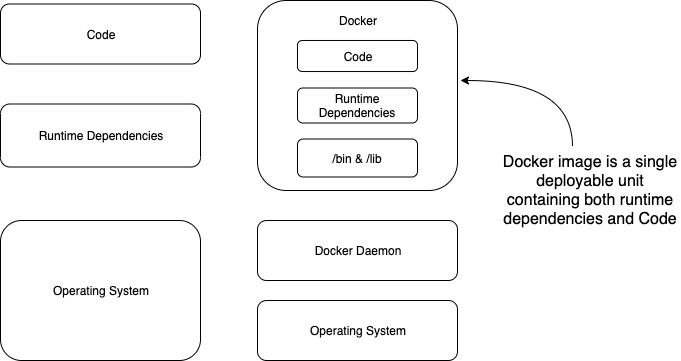
Code is the machine instructions of the application to execute specific tasks. In order to execute the code, runtime dependencies may also be required in order to execute the code. For example, Node.js code will require the Node.js binary and other npm packages in order to execute successfully. In the case of Kubernetes, all runtime dependencies and code are packaged as a deployable unit (aka Docker image) and orchestrated through the Docker Daemon. The application’s Docker image can be confidently run in any environment, from the developer’s laptop to the production cluster running in the cloud, because the image encapsulates the code and all the dependencies, eliminating potential incompatibilities between environments.
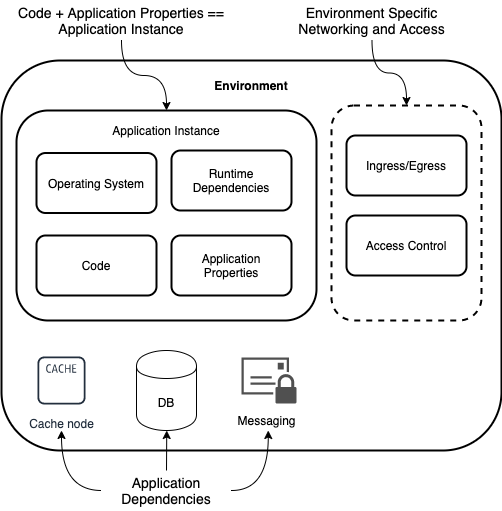
Configuration of environment-specific application properties are typically deployed along with code and runtime dependencies, so the “application instance” can behave and connect to the correct dependencies per environment. Each environment could contain DB storage, Distributed Cache, or Messaging (i.e., “data”) for isolation. Environments also have their own networking policy for ingress and egress for traffic isolation and custom access control. For example, ingress and egress can be configured to block traffic between pre-prod and prod environments for security. Access Control can be configured to restrict access to the production environment to only a small set of engineers, while pre-prod environments are accessible by the entire development team.