concept Helm in category kubernetes

This is an excerpt from Manning's book Learn Kubernetes in a Month of Lunches.
Chapters 7 through 11 build on the basics with subjects that deal with real-world Kubernetes usage. You'll learn how you can run containers which share a common environment, and how you can use containers to run batch jobs and scheduled jobs. You'll learn how Kubernetes supports automated rolling updates so you can release new application versions with zero downtime, and how to use Helm to provide a configurable way to deploy your apps. You'll also learn about the practicalities of building apps with Kubernetes, looking at different developer workflows and CI/CD pipelines.
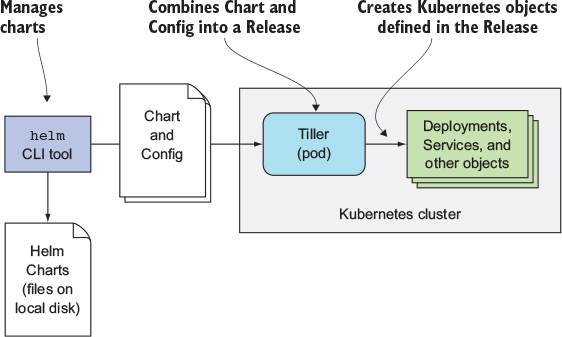
Helm is another layer of abstraction, this time at the application level. When you install an application with Helm it just creates a set of resources in your Kubernetes cluster - and they're standard Kubernetes resources. The Helm packaging format extends Kubernetes YAML files, so a Helm package is really just a set of Kubernetes manifests stored along with some metadata. We'll start by using Helm to deploy one of the sample apps from previous chapters, but first we need to install Helm.
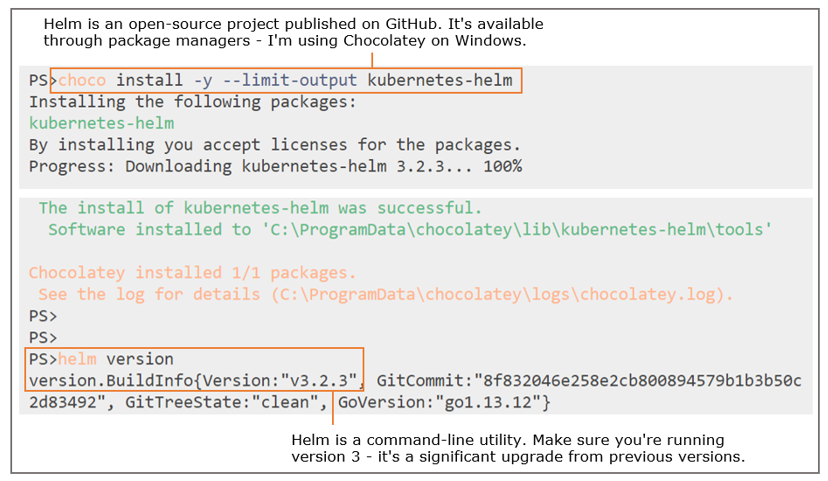
Helm is a cross-platform tool which runs on Windows, macOS and Linux. You can find the latest install instructions here - https://helm.sh/docs/intro/install. This exercise assumes you already have a package manager like Homebrew or Chocolatey installed. If not, you'll need to refer to the Helm site for the full install instructions.
# on Windows, using Chocolatey:
choco install -y kubernetes-helm

# on Mac, using Homebrew:
brew install helm

# on Linux, using the Helm install script:
curl https://raw.githubusercontent.com/helm/helm/master/scripts/get-helm-3 | bash

# and check Helm is working:
helm version
The install steps in that exercise may not work on your system, in which case you'll need to stop here and head to the Helm install docs - we can’t go much further until you have Helm installed, and you see successful output from the version command, like mine in figure 10.1.
Figure 10.1 There are lots of options to install Helm; using a package manager is easiest
Helm is a client-side tool - previous versions of Helm required a server component to be deployed in your Kubernetes cluster, but that was changed in the major update to Helm 3. It uses the same connection information that Kubectl uses to connect to your Kubernetes cluster, so you don't need any extra configuration to install an app. You do need to configure a package repository. Helm repositories are similar to container image registries like Docker Hub, but the server publishes an index of all available packages; Helm caches a local copy of your repository indexes, which you can use to search packages.

This is an excerpt from Manning's book GitOps and Kuberentes.
There’s a chart for that. Undoubtedly, Helm’s biggest strength is its excellent chart repository. Just recently, we had the need to run a highly available Redis, without a persistent volume, to be used as a throwaway cache. There’s something to be said about just being able to throw the
redis-hachart into your namespace, setpersistentVolume.enabled: false, point your service at it, and someone else has already done the hard work of figuring out how to run Redis reliably on a Kubernetes cluster.
This is an excerpt from Manning's book Kubernetes in Action.
Helm is a package manager for Kubernetes (similar to OS package managers like yum or apt in Linux or homebrew in MacOS).