concept load balancer in category kubernetes

This is an excerpt from Manning's book Kubernetes in Action, Second Edition.
The Kube Proxy notices that the application instances are ready to accept connections from clients and configures a load balancer for them.
While Kubernetes allows you to create so-called LoadBalancer services, it doesn’t provide the load balancer itself. If your cluster is deployed in the cloud, Kubernetes can ask the cloud infrastructure to provision a load balancer and configure it to forward traffic into your cluster. The infrastructure tells Kubernetes the IP address of the load balancer and this becomes the external address of your service.
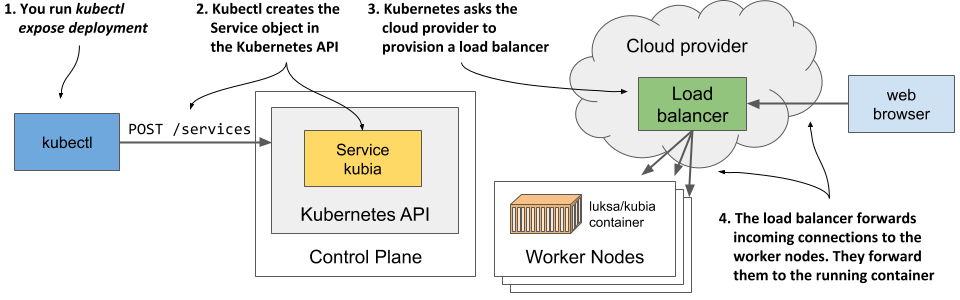
The process of creating the Service object, provisioning the load balancer and how it forwards connections into the cluster is shown in the next figure.
Figure 3.10 How creating a Service object with the type LoadBalancer works
Provisioning of the load balancer takes some time, so let’s wait a few more seconds and check again whether the IP address is already assigned. This time, instead of listing all services, you’ll only display the kubia service by using its name, as shown in the next listing.
Listing 3.14 Getting a single service
$ kubectl get svc kubia
NAME        TYPE          CLUSTER-IP    EXTERNAL-IP    PORT(S)         AGE
kubia       LoadBalancer  10.19.243.17  35.246.179.22  8080:30838/TCP  82s
The external IP is now displayed. This means that the load balancer is ready to forward requests to your application for clients around the world.

This is an excerpt from Manning's book Kubernetes in Action.
The list shows two services. Ignore the kubernetes service for now and take a close look at the kubia-http service you created. It doesn’t have an external IP address yet, because it takes time for the load balancer to be created by the cloud infrastructure Kubernetes is running on. Once the load balancer is up, the external IP address of the service should be displayed. Let’s wait a while and list the services again, as shown in the following listing.
After you create the service, it takes time for the cloud infrastructure to create the load balancer and write its IP address into the Service object. Once it does that, the IP address will be listed as the external IP address of your service:
$ kubectl get svc kubia-loadbalancer
NAME                 CLUSTER-IP       EXTERNAL-IP      PORT(S)         AGE
kubia-loadbalancer   10.111.241.153   130.211.53.173   80:32143/TCP    1m


!@%STYLE%@!
{"css":"{\"css\": \"font-weight: bold;\"}","target":"[[{\"line\":0,\"ch\":0},{\"line\":0,\"ch\":36}],[{\"line\":2,\"ch\":38},{\"line\":2,\"ch\":52}]]"}
!@%STYLE%@!
In this case, the load balancer is available at IP 130.211.53.173, so you can now access the service at that IP address: