concept object in category kubernetes

This is an excerpt from Manning's book Kubernetes in Action, Second Edition.
The Kubernetes API Server exposes the RESTful Kubernetes API. Engineers using the cluster and other Kubernetes components create objects via this API. The etcd distributed datastore persists the objects you create through the API, since the API Server itself is stateless. The Server is the only component that talks to etcd.
It is these resources (or objects) that represent the configuration of the cluster. Cluster administrators and engineers who deploy applications into the cluster therefore influence the configuration by manipulating these objects.
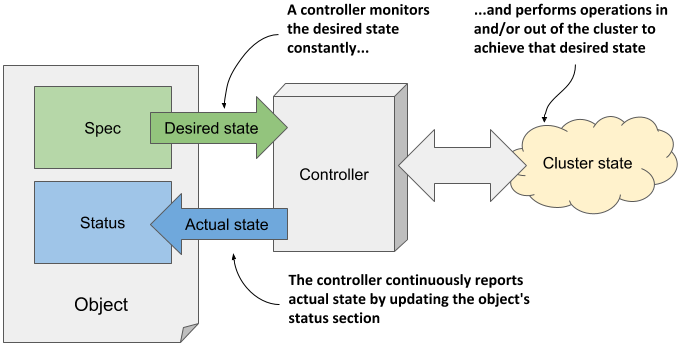
As you may have noticed in the previous figure, the two most important parts of an object are the Spec and Status sections. You use the Spec to specify the desired state of the object and read the actual state of the object from the Status section. So, you are the one who writes the Spec and reads the Status, but who or what reads the Spec and writes the Status?
The Kubernetes Control Plane runs several components called controllers that manage the objects you create. Each controller is usually only responsible for one object type. For example, the Deployment controller manages Deployment objects.
As shown in figure 4.4, the task of a controller is to read the desired object state from the object’s Spec section, perform the actions required to achieve this state, and report back the actual state of the object by writing to its Status section.
Figure 4.4 How a controller manages an object
Listing 4.2 Displaying the complete YAML manifest of an object
$ kubectl get node kind-control-plane -o yaml
apiVersion: v1            #A
kind: Node                #A
metadata:                                                             #B
  annotations: ...                                                    #B
  creationTimestamp: "2020-05-03T15:09:17Z"                           #B
  labels: ...                                                         #B
  managedFields: ...                                                  #B
  name: kind-control-plane                                    #C      #B
  resourceVersion: "3220054"                                          #B
  selfLink: /api/v1/nodes/kind-control-plane                          #B
  uid: 16dc1e0b-8d34-4cfb-8ade-3b0e91ec838b                           #B
spec:                                                                 #D
  podCIDR: 10.244.0.0/24                                      #E      #D
  podCIDRs:                                                   #E      #D
  - 10.244.0.0/24                                             #E      #D
  taints:                                                             #D
  - effect: NoSchedule                                                #D
    key: node-role.kubernetes.io/master                               #D
status:                                                               #F
  addresses:                                                  #G      #F
  - address: 172.18.0.2                                       #G      #F
    type: InternalIP                                          #G      #F
  - address: kind-control-plane                               #G      #F
    type: Hostname                                            #G      #F
  allocatable: ...                                                    #F
  capacity:                                                   #H      #F
    cpu: "8"                                                  #H      #F
    ephemeral-storage: 401520944Ki                            #H      #F
    hugepages-1Gi: "0"                                        #H      #F
    hugepages-2Mi: "0"                                        #H      #F
    memory: 32720824Ki                                        #H      #F
    pods: "110"                                               #H      #F
  conditions:                                                         #F
  - lastHeartbeatTime: "2020-05-17T12:28:41Z"                         #F
    lastTransitionTime: "2020-05-03T15:09:17Z"                        #F
    message: kubelet has sufficient memory available                  #F
    reason: KubeletHasSufficientMemory                                #F
    status: "False"                                                   #F
    type: MemoryPressure                                              #F
    ...                                                               #F
  daemonEndpoints:                                                    #F
    kubeletEndpoint:                                                  #F
      Port: 10250                                                     #F
  images:                                                     #I      #F
  - names:                                                    #I      #F
    - k8s.gcr.io/etcd:3.4.3-0                                 #I      #F
    sizeBytes: 289997247                                      #I      #F
    ...                                                       #I      #F
  nodeInfo:                                                   #J      #F
    architecture: amd64                                       #J      #F
    bootID: 233a359f-5897-4860-863d-06546130e1ff              #J      #F
    containerRuntimeVersion: containerd://1.3.3-14-g449e9269  #J      #F
    kernelVersion: 5.5.10-200.fc31.x86_64                     #J      #F
    kubeProxyVersion: v1.18.2                                 #J      #F
    kubeletVersion: v1.18.2                                   #J      #F
    machineID: 74b74e389bb246e99abdf731d145142d               #J      #F
    operatingSystem: linux                                    #J      #F
    osImage: Ubuntu 19.10                                     #J      #F
    systemUUID: 8749f818-8269-4a02-bdc2-84bf5fa21700          #J      #F
This is an excerpt from Manning's book Kubernetes in Action.
The kubectl get command can list all kinds of Kubernetes objects. You’ll use it constantly, but it usually shows only the most basic information for the listed objects.
$ kubectl explain pods
DESCRIPTION:
Pod is a collection of containers that can run on a host. This resource
             is created by clients and scheduled onto hosts.
FIELDS:
   kind      <string>
     Kind is a string value representing the REST resource this object
     represents...
   metadata  <Object>
     Standard object's metadata...
   spec      <Object>
     Specification of the desired behavior of the pod...
   status    <Object>
     Most recently observed status of the pod. This data may not be up to
     date...


!@%STYLE%@!
{"css":"{\"css\": \"font-weight: bold;\"}","target":"[[{\"line\":0,\"ch\":0},{\"line\":0,\"ch\":22}]]"}
!@%STYLE%@!
The limits specified in a LimitRange resource apply to each individual pod/container or other kind of object created in the same namespace as the LimitRange object. They don’t limit the total amount of resources available across all the pods in the namespace. This is specified through ResourceQuota objects, which are explained in section 14.5.
A ResourceQuota can also be configured to limit the number of Pods, Replication-Controllers, Services, and other objects inside a single namespace. This allows the cluster admin to limit the number of objects users can create based on their payment plan, for example, and can also limit the number of public IPs or node ports Services can use.
The following listing shows what a ResourceQuota object that limits the number of objects may look like.