concept ReplicationController in category kubernetes
This is an excerpt from Manning's book Kubernetes in Action.
As I’ve already explained, you’re not creating and working with containers directly. Instead, the basic building block in Kubernetes is the pod. But, you didn’t really create any pods either, at least not directly. By running the kubectl run command you created a ReplicationController, and this ReplicationController is what created the actual Pod object. To make that pod accessible from outside the cluster, you told Kubernetes to expose all the pods managed by that ReplicationController as a single Service. A rough picture of all three elements is presented in figure 2.7.

A ReplicationController is a Kubernetes resource that ensures its pods are always kept running. If the pod disappears for any reason, such as in the event of a node disappearing from the cluster or because the pod was evicted from the node, the ReplicationController notices the missing pod and creates a replacement pod.
Figure 4.1 shows what happens when a node goes down and takes two pods with it. Pod A was created directly and is therefore an unmanaged pod, while pod B is managed by a ReplicationController. After the node fails, the ReplicationController creates a new pod (pod B2) to replace the missing pod B, whereas pod A is lost completely—nothing will ever recreate it.
The ReplicationController in the figure manages only a single pod, but Replication-Controllers, in general, are meant to create and manage multiple copies (replicas) of a pod. That’s where ReplicationControllers got their name from.

Listing 4.4. A YAML definition of a ReplicationController: kubia-rc.yaml
apiVersion: v1
kind: ReplicationController        #1
metadata:
  name: kubia                      #2
spec:
  replicas: 3                      #3
  selector:                        #4
    app: kubia                     #4
  template:                        #5

    metadata:                      #5

      labels:                      #5

        app: kubia                 #5

    spec:                          #5

      containers:                  #5

      - name: kubia                #5

        image: luksa/kubia         #5

        ports:                     #5

        - containerPort: 8080      #5
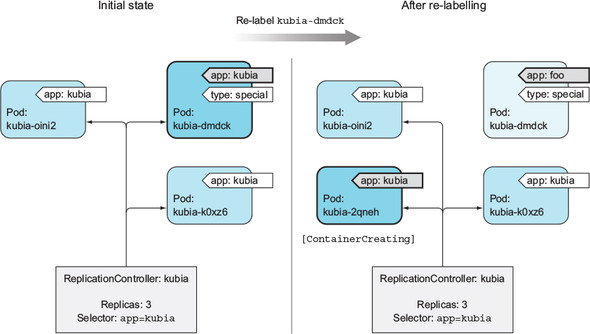
Pods created by a ReplicationController aren’t tied to the ReplicationController in any way. At any moment, a ReplicationController manages pods that match its label selector. By changing a pod’s labels, it can be removed from or added to the scope of a ReplicationController. It can even be moved from one ReplicationController to another.
Figure 4.5 illustrates what happened when you changed the pod’s labels so they no longer matched the ReplicationController’s pod selector. You can see your three pods and your ReplicationController. After you change the pod’s label from app=kubia to app=foo, the ReplicationController no longer cares about the pod. Because the controller’s replica count is set to 3 and only two pods match the label selector, the ReplicationController spins up pod kubia-2qneh to bring the number back up to three. Pod kubia-dmdck is now completely independent and will keep running until you delete it manually (you can do that now, because you don’t need it anymore).