concept RoleBinding in category kubernetes

This is an excerpt from Manning's book GitOps and Kuberentes.
In the worst case, an attacker with full access to the git repository would be able to push a new commit to the git repo containing a Deployment with a malicious container in the cluster. This might be complemented with a Role and RoleBinding that could grant the Deployment enough privileges to read Secrets and exfiltrate sensitive information.
The RoleBinding enables the Role to be connected with the subjects. A sample RoleBinding definition is represented below:
Listing 6.5 Sample Role Binding (role-binding.yaml)
apiVersion: rbac.authorization.k8s.io/v1
kind: RoleBinding
metadata:
  name: sample-role-binding
roleRef:
  apiGroup: rbac.authorization.k8s.io
  kind: Role
  name: sample-role
subjects:
- kind: ServiceAccount
  name: sample-service-account
The represented sample RoleBinding grants a set of permissions defined in the Role named
sample-roleto the ServiceAccount namedsample-service-account. Similarly to the Role, a RoleBinding has an equivalent object, ClusterRoleBinding, that allows connecting subjects with the ClusterRole.

This is an excerpt from Manning's book Kubernetes in Action.
The distinction between a Role and a ClusterRole, or between a RoleBinding and a ClusterRoleBinding, is that the Role and RoleBinding are namespaced resources, whereas the ClusterRole and ClusterRoleBinding are cluster-level resources (not namespaced). This is depicted in figure 12.3.
A regular Role only allows access to resources in the same namespace the Role is in. If you want to allow someone access to resources across different namespaces, you have to create a Role and RoleBinding in every one of those namespaces. If you want to extend this to all namespaces (this is something a cluster administrator would probably need), you need to create the same Role and RoleBinding in each namespace. When creating an additional namespace, you have to remember to create the two resources there as well.
Figure 12.7. A RoleBinding referencing a ClusterRole doesn’t grant access to clusterlevel resources.
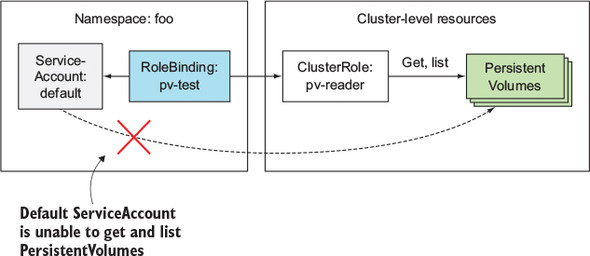
Although you can create a RoleBinding and have it reference a ClusterRole when you want to enable access to namespaced resources, you can’t use the same approach for cluster-level (non-namespaced) resources. To grant access to cluster-level resources, you must always use a ClusterRoleBinding.
Now, let’s see what happens if you replace the ClusterRoleBinding with a RoleBinding. First, delete the ClusterRoleBinding:
$ kubectl delete clusterrolebinding view-test
clusterrolebinding "view-test" deleted


!@%STYLE%@!
{"css":"{\"css\": \"font-weight: bold;\"}","target":"[[{\"line\":0,\"ch\":0},{\"line\":0,\"ch\":45}]]"}
!@%STYLE%@!
Next create a RoleBinding instead. Because a RoleBinding is namespaced, you need to specify the namespace you want to create it in. Create it in the foo namespace:
$ kubectl create rolebinding view-test --clusterrole=view
➥  --serviceaccount=foo:default -n foo
rolebinding "view-test" created


!@%STYLE%@!
{"css":"{\"css\": \"font-weight: bold;\"}","target":"[[{\"line\":0,\"ch\":0},{\"line\":0,\"ch\":57}],[{\"line\":1,\"ch\":3},{\"line\":1,\"ch\":38}]]"}
!@%STYLE%@!
You now have a RoleBinding in the foo namespace, binding the default Service-Account in that same namespace with the view ClusterRole. What can your pod access now?