concept traffic in category kubernetes

This is an excerpt from Manning's book Learn Kubernetes in a Month of Lunches.
Chapters 2 through 6 jump in to running apps on Kubernetes. You'll learn how to define applications in YAML manifests which Kubernetes will run as containers, how you can configure network access for containers to talk to each other, and for traffic from the outside world to reach your containers. You'll learn how your apps can read configuration from Kubernetes and write data to storage units managed by Kubernetes, and how you can scale your applications.
# listen on port 8080 on your machine and send traffic
# to the pod on port 80:
kubectl port-forward pod/hello-kiamol 8080:80

# now browse to http://localhost:8080

# when you're done hit ctrl-c to end the port-forward
Figure 12.1 The list of endpoints for a Service excludes Pods which are not ready to receive traffic


This is an excerpt from Manning's book Getting Started with Kubernetes.
This shows the state of the deployment. As mentioned earlier, the deployment is the statement of the desired state of the system, for example, I want 3 copies of the pod. When you created the deployment and the system returned a success response, this simply meant that it accepted your deployment for scheduling – not that everything had already been scheduled in the manner you desired. Querying the deployment with
getwill show you the current status such as how many of the Pods are ready to serve traffic, and later when you update the deployment, how many of the pods are running the latest version during a roll out of a new version.
Kubernetes can also help you update your application without outages and glitches by booting the new version of the application and monitoring its status to ensure it’s ready to serve traffic, before removing the old version.
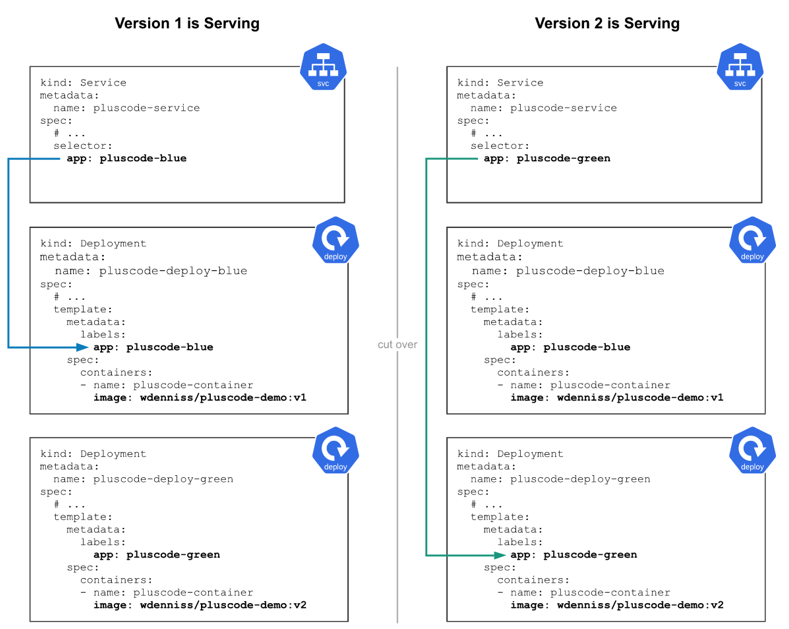
Figure: One service with a “blue” and “green” deployment with different versions of the same application. The service’s selector is used to route traffic to the live version.