concept Ext plugin in category liferay

This is an excerpt from Manning's book Liferay in Action: The Official Guide to Liferay Portal Development.
This book will systematically show you how to write your own portlets so that your applications can be added seamlessly to your Liferay-powered web site’s pages in a way that is indistinguishable from the built-in portlets. You’ll also learn how to customize Liferay’s layout templates so that your page layouts can be what you want them to be. You’ll learn about hooks, which let you customize Liferay by substituting your own classes and JSPs in the place of Liferay’s. And finally, you’ll learn about Ext plugins, which let you override anything in Liferay with functionality of your own.
Now, what does Ext actually do? I’m glad you asked. It’s different from the other plugin types with which you’ve been working. Ext plugins replace the parts of the original Liferay installation that you’ve customized with your own code. Any areas you haven’t customized are left alone. Because the changes go into the Liferay installation, the server needs to be shut down and restarted after deploying an Ext plugin. And because you’re modifying the original Liferay installation, an Ext plugin isn’t all that easy to undeploy. This is more of that great responsibility stuff you need to be aware of when exercising Great Power.
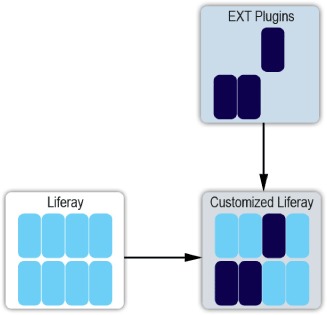
The structure of an Ext plugin closely mirrors the Liferay source, so as to provide an overlay for Liferay’s functions. Table 9.1 describes this structure and what the folders are for.
Table 9.1. Ext plugin structure
Directory
Purpose
The root directory. Because an Ext plugin is organized like a web module, it contains a docroot directory (which contains a WEB-INF directory) as well as a build script. Because all of the folders that make up the plugin are in the WEB-INF folder, the rest of the list will work from there. ext-impl Contains all your source and configuration files (except those related to the web application). When an Ext plugin is created, several important files are placed in its subdirectories. The most significant are as follows:
- /src/portal-ext.properties—Used to override the values of the properties in the portal.properties configuration file that ships with Liferay Portal.
- /src/system-ext.properties—Used to override the values of the properties in the system.properties configuration file that ships with Liferay Portal.
- /src/content/Language-ext.properties—Used to add your own internationalized text messages or to override the messages that ship with Liferay Portal, just as you’ve seen with plugins. You can add variations for other languages using the Java convention for message bundles. For example, the translation to Spanish should be named Language-ext_es.properties.
ext-lib Contains any extra dependency libraries. ext-service Contains the classes that are generated by Liferay’s service builder. This works exactly the same way it does with plugins. Note that this functionality is left over for those migrating from older versions of Liferay, is deprecated in Liferay 6, and may be removed in future releases. If you need to create shared services, use a plugin to do it and then place the service .jar on the server’s global class path. ext-util-bridges Corresponds to the util-bridges folder in the Liferay source. ext-util-java Corresponds to the util-java folder in the Liferay source. ext-util-taglib Corresponds to the util-taglib folder in the Liferay source. ext-web Contains your JSPs, HTML, images, JavaScript, and all other web application-related files in the docroot subdirectory. Here are some of the most common activities you’ll perform from this docroot subdirectory:
- To add entries to the web application configuration file, edit/docroot/WEB-INF/web.xml.
- To add a portlet, edit/docroot/WEB-INF/portlet-ext.xml, /docroot/WEB-INF/liferay-portlet-ext.xml, and /docroot/WEB-INF/liferay-display.xml. You may also want to edit /ext-impl/src/content/Language-ext.properties. These *-ext.xml files are read after their parent files are read and override their parent values. Note that I don’t recommend adding portlets in the Ext plugin; it’s far better to write a portlet plugin instead.
- If you’re customizing some of Liferay’s internal StrutsPortlets, the following files will also be of interest to you: docroot/WEB-INF/struts-config.xml and docroot/WEB-INF/tiles-defs.xml.