concept database in category lift

This is an excerpt from Manning's book Lift in Action: The Simply Functional Web Framework for Scala.
Snippets are rendering functions that take XML input from within a given page template and then transform that input based upon the logic within the snippet function. For example, when rendering a list of items, the template could contain the markup for a single item, and then the snippet function would generate the markup for an entire list of items, perhaps by querying the database and then iterating over the result set to produce the desired list of items.
This is all well and good, but at this point the instance hasn’t been saved, and the database is still untouched. There are a couple of ways to save the instance:
scala>Publisher.create.name("Manning").description("Great company").save()
res5: Boolean = true

scala>Publisher.create.name("Manning").description("Great company").saveMe()
res6: sample.model.Publisher = sample.model.Publisher={...}
The first command here saves the entity to the database and returns a true value if the operation is successful. The second command calls saveMe, which returns the resulting instance as opposed to a Boolean. This can be helpful if you need to continue to work with the same entity after it has been saved. Both of these operations are capable of throwing exceptions if there was a fatal error in conducting the insert operation.
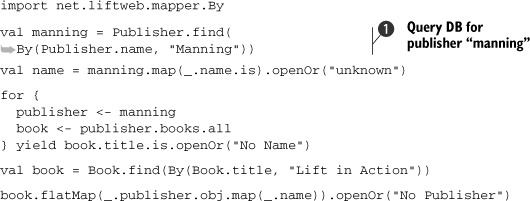
Let’s now investigate how to actually use the resulting values once you’ve retrieved an instance from the database. The following listing details such an example.
This listing demonstrates a couple of different operations using a specific publisher instance once it has been retrieved from the database
. The first technique is for accessing a specific field (or set of fields) but that provides a default value in case the database call was not successful or yields no results. Note the specific use of the is method on the name field. All MappedField subtypes have an is method for obtaining the value they contain, which in this case is a String.
Before diving into the specifics of how to use the Mapper abstractions, you need to have a database to work with. Two databases have proven to be particularly popular in the open source space—MySQL (http://www.mysql.com/) and PostgreSQL (http://www.postgresql.org/)—whereas in the commercial fields, Microsoft SQL Server (http://www.microsoft.com/sqlserver/) and Oracle (http://www.oracle.com/us/products/database/index.html) are still very prevalent. Despite each of these products making use of extensions to the SQL standard and implementing a slightly different dialect for commonly used operations, Mapper ships with drivers for each of these database stores and a whole set of others (Derby, H2, MaxDB, Sybase, Sybase ASE), so you can move platforms with the minimum of fuss.