concept PhraseQuery in category lucene

This is an excerpt from Manning's book Lucene in Action, Second Edition.
Lucene comes with a number of concrete Query subclasses. So far in this chapter we’ve mentioned only the most basic Lucene Query: TermQuery. Other Query types are BooleanQuery, PhraseQuery, PrefixQuery, PhrasePrefixQuery, TermRangeQuery, NumericRangeQuery, FilteredQuery, and SpanQuery. All of these are covered in chapters 3 and 5. Query is the common, abstract parent class. It contains several utility methods, the most interesting of which is setBoost(float), which enables you to tell Lucene that certain subqueries should have a stronger contribution to the final relevance score than other subqueries. The setBoost method is described in section 3.5.12. Next we cover TermQuery, which is the building block for most complex queries in Lucene.
A PhraseQuery (see section 3.4.6) matches documents that have terms near one another, with a slop factor to allow for intermediate or reversed terms. SpanNearQuery operates similarly to PhraseQuery, with some important differences. SpanNearQuery matches spans that are within a certain number of positions from one another, with a separate flag indicating whether the spans must be in the order specified or can be reversed. The resulting matching spans span from the start position of the first span sequentially to the ending position of the last span. An example of a SpanNearQuery given three SpanTermQuery objects is shown in figure 5.3.
Using SpanTermQuery objects as the SpanQuerys in a SpanNearQuery is much like using a PhraseQuery. The SpanNearQuery slop factor is a bit less confusing than the PhraseQuery slop factor because it doesn’t require at least two additional positions to account for a reversed span. To reverse a SpanNearQuery, set the inOrder flag (third argument to the constructor) to false. Listing 5.10 demonstrates a few variations of SpanNearQuery and shows it in relation to PhraseQuery.

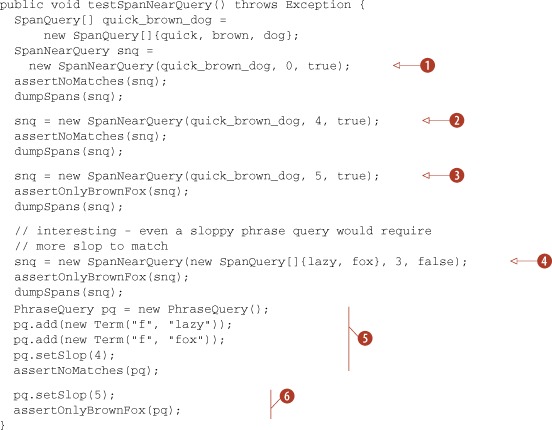


Recall from section 3.4.6 that PhraseQuery is impartial to term order when enough slop is specified. Interestingly, you can easily extend QueryParser to use a SpanNearQuery with SpanTermQuery clauses instead, and force phrase queries to only match fields with the terms in the same order as specified. We demonstrate this technique in section 6.3.5.
The built-in MultiPhraseQuery is definitely a niche query, but it’s potentially useful. MultiPhraseQuery is just like PhraseQuery except that it allows multiple terms per position. You could achieve the same logical effect, albeit at a high performance cost, by enumerating all possible phrase combinations and using a BooleanQuery to “OR” them together.
Just as with PhraseQuery, the slop factor is supported. In testBasic(), the slop is used to match "quick brown fox" in the second search; with the default slop of 0, it doesn’t match. For completeness, listing 5.5 shows a test illustrating the described BooleanQuery, with a slop set for "quick fox".
Listing 5.5. Mimicking MultiPhraseQuery using BooleanQuery
public void testAgainstOR() throws Exception { PhraseQuery quickFox = new PhraseQuery(); quickFox.setSlop(1); quickFox.add(new Term("field", "quick")); quickFox.add(new Term("field", "fox")); PhraseQuery fastFox = new PhraseQuery(); fastFox.add(new Term("field", "fast")); fastFox.add(new Term("field", "fox")); BooleanQuery query = new BooleanQuery(); query.add(quickFox, BooleanClause.Occur.SHOULD); query.add(fastFox, BooleanClause.Occur.SHOULD); TopDocs hits = searcher.search(query, 10); assertEquals(2, hits.totalHits); }