concept Query in category lucene

This is an excerpt from Manning's book Lucene in Action, Second Edition.
Lucene doesn’t provide any default search UI; it’s entirely up to your application to build one. Once a user interacts with your search interface, she or he submits a search request, which first must be translated into an appropriate Query object for the search engine.
Table 3.1. Lucene’s primary searching API
Class
Purpose
IndexSearcher Gateway to searching an index. All searches come through an IndexSearcher instance using any of the several overloaded search methods. Query (and subclasses) Concrete subclasses encapsulate logic for a particular query type. Instances of Query are passed to an IndexSearcher’s search method. QueryParser Processes a human-entered (and readable) expression into a concrete Query object. TopDocs Holds the top scoring documents, returned by IndexSearcher.search. ScoreDoc Provides access to each search result in TopDocs.
Seemingly strange things can happen to a query expression as it’s parsed with QueryParser. How can you tell what really happened to your expression? Was it translated properly into what you intended? One way to peek at a resultant Query instance is to use its toString() method.
All concrete core Query classes we’ve discussed in this chapter have a special toString() implementation. The standard Object.toString() method is overridden and delegates to a toString(String field) method, where field is the name of the default field. Calling the no-arg toString() method uses an empty default field name, causing the output to explicitly use field selector notation for all terms. Here’s an example of using the toString() method:
public void testToString() throws Exception {
  BooleanQuery query = new BooleanQuery();
  query.add(new FuzzyQuery(new Term("field", "kountry")),
            BooleanClause.Occur.MUST);
  query.add(new TermQuery(new Term("title", "western")),
            BooleanClause.Occur.SHOULD);
  assertEquals("both kinds", "+kountry~0.5 title:western",
               query.toString("field"));
}
The toString() methods (particularly the String-arg one) are handy for visual debugging of complex API queries as well as getting a handle on how QueryParser interprets query expressions. Don’t rely on the ability to go back and forth accurately between a Query.toString() representation and a QueryParser-parsed expression, though. It’s generally accurate, but an analyzer is involved and may confuse things; this issue is discussed further in section 4.1.2. Let’s begin, again, with the simplest Query type, TermQuery.
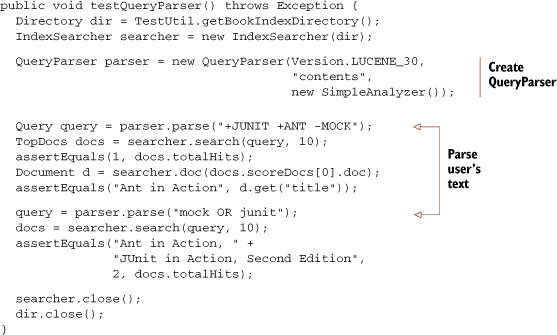
Lucene’s search methods require a Query object. Parsing a query expression is the act of turning a user-entered textual query such as “mock OR junit” into an appropriate Query object instance; in this case, the Query object would be an instance of BooleanQuery with two optional clauses, one for each term. The process is illustrated in figure 3.1. The code in listing 3.2 parses two query expressions and asserts that they worked as expected. After returning the hits, we retrieve the title from the first document found.
Lucene includes an interesting built-in feature that parses query expressions, available through the QueryParser class. It parses rich expressions such as the two shown ("+JUNIT +ANT -MOCK" and "mock OR junit") into one of the Query implementations. The resulting Query instances can be very rich and complex! Dealing with human-entered queries is the primary purpose of the QueryParser. Once you have the Query object returned by QueryParser, the rest of the searching is identical to how you’d search programmatically.
As you can see in figure 3.1, QueryParser requires an analyzer to break pieces of the query text into terms. In the first expression, the query was entirely uppercased. The terms of the contents field, however, were lowercased when indexed. QueryParser, in this example, uses SimpleAnalyzer, which lowercases the terms before constructing a Query object. (Analysis is covered in great detail in the next chapter, but it’s intimately intertwined with indexing text and searching with QueryParser.) The main point regarding analysis to consider in this chapter is that you need to be sure to query on the actual terms indexed. QueryParser is the only searching piece that uses an analyzer. Querying through the API using TermQuery and the others discussed in section 3.4 doesn’t require an analyzer but does rely on matching terms to what was indexed. Therefore, if you construct queries entirely programmatically you must ensure the terms included in all of your queries match the tokens produced by the analyzer used during indexing. In section 4.1.2, we talk more about the interactions of QueryParser and the analysis process.