concept SpanQuery in category lucene

This is an excerpt from Manning's book Lucene in Action, Second Edition.
Lucene comes with a number of concrete Query subclasses. So far in this chapter we’ve mentioned only the most basic Lucene Query: TermQuery. Other Query types are BooleanQuery, PhraseQuery, PrefixQuery, PhrasePrefixQuery, TermRangeQuery, NumericRangeQuery, FilteredQuery, and SpanQuery. All of these are covered in chapters 3 and 5. Query is the common, abstract parent class. It contains several utility methods, the most interesting of which is setBoost(float), which enables you to tell Lucene that certain subqueries should have a stronger contribution to the final relevance score than other subqueries. The setBoost method is described in section 3.5.12. Next we cover TermQuery, which is the building block for most complex queries in Lucene.
Listing 5.8. SpanQuery demonstration infrastructure
public class SpanQueryTest extends TestCase { private RAMDirectory directory; private IndexSearcher searcher; private IndexReader reader; private SpanTermQuery quick; private SpanTermQuery brown; private SpanTermQuery red; private SpanTermQuery fox; private SpanTermQuery lazy; private SpanTermQuery sleepy; private SpanTermQuery dog; private SpanTermQuery cat; private Analyzer analyzer; protected void setUp() throws Exception { directory = new RAMDirectory(); analyzer = new WhitespaceAnalyzer(); IndexWriter writer = new IndexWriter(directory, analyzer, IndexWriter.MaxFieldLength.UNLIMITED); Document doc = new Document(); doc.add(new Field("f", "the quick brown fox jumps over the lazy dog", Field.Store.YES, Field.Index.ANALYZED)); writer.addDocument(doc); doc = new Document(); doc.add(new Field("f", "the quick red fox jumps over the sleepy cat", Field.Store.YES, Field.Index.ANALYZED)); writer.addDocument(doc); writer.close(); searcher = new IndexSearcher(directory); reader = searcher.getIndexReader(); quick = new SpanTermQuery(new Term("f", "quick")); brown = new SpanTermQuery(new Term("f", "brown")); red = new SpanTermQuery(new Term("f", "red")); fox = new SpanTermQuery(new Term("f", "fox")); lazy = new SpanTermQuery(new Term("f", "lazy")); sleepy = new SpanTermQuery(new Term("f", "sleepy")); dog = new SpanTermQuery(new Term("f", "dog")); cat = new SpanTermQuery(new Term("f", "cat")); } private void assertOnlyBrownFox(Query query) throws Exception { TopDocs hits = searcher.search(query, 10); assertEquals(1, hits.totalHits); assertEquals("wrong doc", 0, hits.scoreDocs[0].doc); } private void assertBothFoxes(Query query) throws Exception { TopDocs hits = searcher.search(query, 10); assertEquals(2, hits.totalHits); } private void assertNoMatches(Query query) throws Exception { TopDocs hits = searcher.search(query, 10); assertEquals(0, hits.totalHits); } }
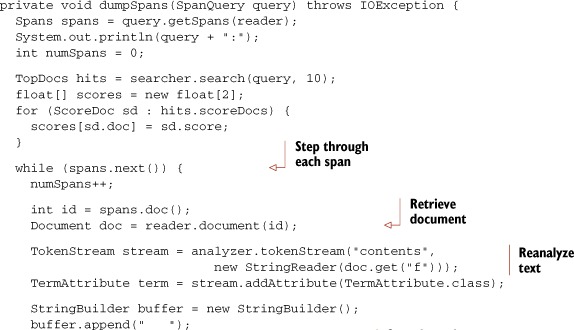
Let’s see how to boost specific term occurrences using payloads. We’ll start with the steps required to add payloads to tokens during analysis. Then, we’ll perform searches that take our custom payloads into account. Finally, we’ll explore two other ways to interact with payloads in Lucene: first via SpanQuery and second by directly accessing Lucene’s TermPositions API.
Although using PayloadTermQuery and PayloadNearQuery is the simplest way to use payloads to alter scoring of documents, all of the SpanQuery classes allow expert access to the payloads that occur within each matching span returned by the getSpans method. At this point, none of the SpanQuery classes, besides SpanTermQuery and SpanNearQuery, have subclasses that make use of the payloads. It’s up to you to subclass a SpanQuery class and override the getSpans method if you’d like to filter documents that match based on payload, or override the SpanScorer class to provide custom scoring based on the payloads contained within each matched span. These are advanced use cases, and only a few users have ventured into this territory, so your best bet for inspiration is to spend some quality time on Lucene’s users list.