concept Docker in category machine learning

This is an excerpt from Manning's book Machine Learning Bookcamp.
In this section, we'll see how to manage dependencies of our application in an isolated way that doesn't interfere with other services. We'll cover two tools for this: Pipenv, for managing Python libraries and Docker, for managing the system dependencies such as the operating system and the system libraries.
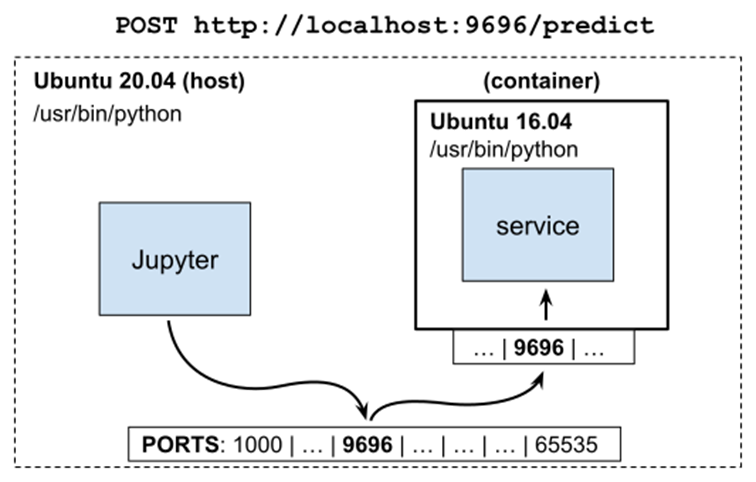
Figure 5.7. The 9696 port on the host machine is mapped to the 9696 port of the container, so when we send a request to localhost:9696, it's handled by our service in Docker
A.5 Installing Docker
In chapter 5, we use Docker to package our application in an isolated container. It's quite easy to install.
Hello from Docker!
This message shows that your installation appears to be working correctly.
This is an excerpt from Manning's book Machine Learning Systems: Designs that scale.
Next, reactive systems use containment to prevent the failure of any single component of the system from affecting any other component. The term containment might get you thinking about specific technologies like Docker and rkt, but this strategy isn’t about any one implementation. Containment can be implemented using many different systems, including homegrown ones. The point is to prevent the sort of cascading failure we saw in Pooch Predictor, and to do so at a structural level.
The Hareloom Farms team chooses to use Docker, a popular implementation of containers, as their standard method of packaging applications. One reason you choose Docker specifically is that a wealth of tooling and infrastructure has been built around Docker, some of which you’ll see in this chapter and some in the next.
For the latest instructions on how to install Docker, visit the Docker website: www.docker.com. This technology is evolving fast, and the setup details vary a great deal by OS. Regardless of how you choose to set up Docker, once you can run docker run hello-world and see a successful result, your installation is complete, and you can begin containerizing applications!
Next, you’ll need to set up some functionality within your build to help you containerize your model service. Sbt is a sophisticated build tool that you can use to do a lot of tasks related to building and deploying your code. For instructions on how to get started with sbt, see the Download section (www.scala-sbt.org/download.html) of the sbt website (www.scala-sbt.org). In this case, you’ll use a plugin for sbt called sbt-docker that will help you work with Docker. To install this plugin, add it to your /project/plugins.sbt file.

This is an excerpt from Manning's book Machine Learning with TensorFlow.
Docker is a system for packaging software dependencies to keep everyone’s installation environment identical. This standardization helps limit inconsistencies between computers. It’s a relatively recent technology, so let’s go through how to use it.