concept disk in category mesos

This is an excerpt from Manning's book Mesos in Action.
disk—Storage
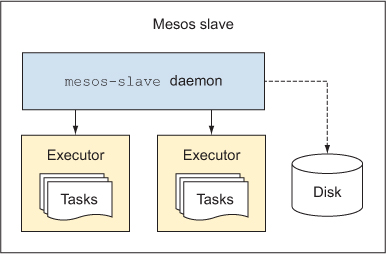
Running (live) executors and tasks are capable of surviving a failure or restart/upgrade of the mesos-slave daemon by checkpointing certain information about the tasks and executors to disk. It’s worth remembering that in the event of a full system reboot, slave recovery isn’t possible because the executors and tasks will have been killed along with the mesos-slave daemon. If the entire machine fails, the scheduler will detect the failure and reschedule the tasks on other machines in the cluster. Otherwise, slave recovery is a useful feature for performing rolling upgrades of the Mesos cluster software.
The Mesos slave checkpoints information about the executors and tasks to disk, as shown in figure 4.6. If the mesos-slave daemon is unavailable, the executor automatically caches any status updates from the running tasks until the slave daemon starts again.
filesystem/shared—Maps a directory inside a container to a location on disk, ensuring that the container has a private working directory that’s either read-write or read-only. Can be specified by the framework, or used in conjunction with the --default_container_info. The following example maps the /tmp directory in the container to the private directory relative to the sandbox’s working directory: { "type": "MESOS", "volumes": [ { "host_path": "private", "container_path": "/tmp", "mode": "RW" } ] }