concept job in category mesos
appears as: job, The job, jobs, job, jobs

This is an excerpt from Manning's book Mesos in Action.
Now consider a user submitting a Spark job to be run on the cluster. The scheduler accepts the job and waits for a resource offer that satisfies the workload.
The job can’t run more often than once per minute. The job isn’t capable of having parent/child dependencies on other jobs.
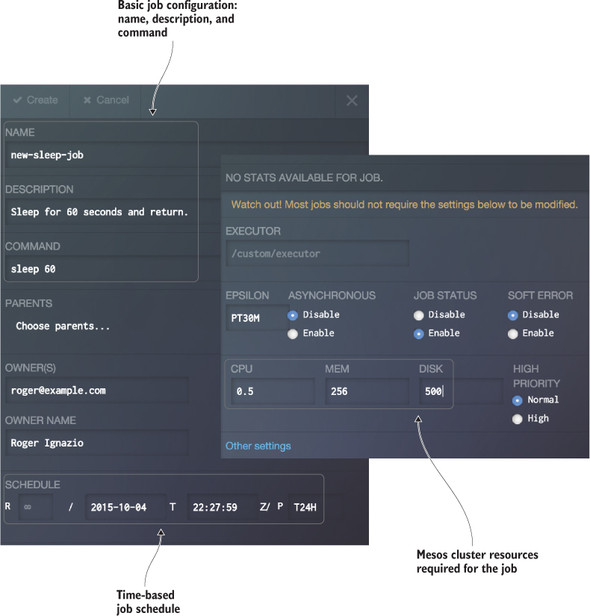
The web UI provides various fields when creating a job; these include name, description, command, and schedule. For the most part, they’re self-explanatory. In figure 8.3, you create a simple job that sleeps for 60 seconds and exits.
Clicking the advanced options link for a job allows you to set additional options, such as the epsilon (the amount of time Chronos will wait for a resource offer from Mesos) and the resources required to run the job (CPUs, memory, disk, and so forth). For now, the defaults are fine, and you shouldn’t need to modify those options. I’m showing them here in the interest of completeness.
Alerting that a job is in an error state: errorsSinceLastSuccess will be 0 if the last run of the job was successful. If this is positive, the job is currently in a failed state. Alerting that the timestamp of a job’s last successful run is outside a given SLA: lastSuccess could be used to escalate an alert to an engineering manager or product manager if a business-critical data processing job that should run every hour hasn’t been successful in the last 3 hours. Alerting on the failure rate of a particular job: you could create a check that uses the formula failure_pct = errorCount / (errorCount + successCount) to determine how often a job completes successfully.