concept ZooKeeper in category mesos

This is an excerpt from Manning's book Mesos in Action.
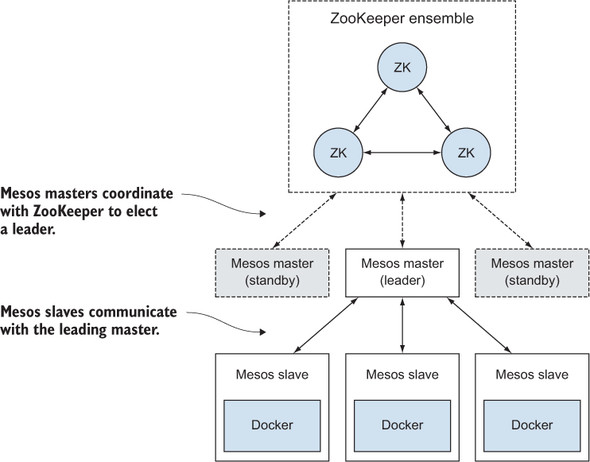
One or more Mesos masters are responsible for managing the Mesos slave daemons running on each machine in the cluster. Using ZooKeeper, they coordinate which node will be the leading master, and which masters will be on standby, ready to take over if the leading master goes offline.
For a production environment, you’ll want a minimum of three Mesos masters and three servers making up the ZooKeeper ensemble. For development purposes, you can get away with a single Mesos master running a single instance of ZooKeeper, but note that you won’t have any redundancy in the system.
In figure 3.1, you can visualize the multiple Mesos masters using ZooKeeper for coordination, and the various Mesos slaves (in this case, also running Docker) communicating with the leading Mesos master.
Although ZooKeeper is illustrated as a standalone service running separate from the Mesos masters, you’ll opt for a slightly simpler deployment overall and install ZooKeeper alongside Mesos on each of the Mesos master machines. Don’t worry about memorizing this graphic; I’ll repeat it as you make your way through the installation and configuration of the cluster.
If that last check worked, fantastic! ZooKeeper is up and running and ready to serve your Mesos cluster. Chapter 6 covers monitoring the ZooKeeper cluster a bit more. But for now, the ZooKeeper ensemble is up and running, so let’s proceed to configure Mesos.
You can configure, compile, and install Mesos in various ways. In the following example, you’ll use the default configuration as specified by the Mesos configure script. It’s worth noting that by default, compiling Mesos also compiles a bundled version of ZooKeeper.
If you’d like to compile ZooKeeper separately or use a different version, you can do so by configuring Mesos prior to compilation time. A complete list of the options you can pass to the configure script can be found with the Mesos project documentation at http://mesos.apache.org/documentation/latest/configuration/.